
Top 6 Essential AI Automation Tools for Beginners
I remember feeling completely overwhelmed when I first started looking into AI automation tools for beginners. There were so many options, and every platform claimed to be the best. As a beginner, it is tough to separate the hype from the genuinely useful software. That is exactly why I wrote this guide. I want to help you cut through the noise and find the right tools for your workflow. After testing dozens of platforms, I have narrowed it down to the six that are truly beginner friendly. Let me walk you through each one so you can make an informed decision.

Overview of AI Automation Tools for Beginners
AI automation tools are software applications that use artificial intelligence to handle repetitive tasks for you. These tasks can include scheduling emails, managing data, creating content, or even generating images. For a novice user, this technology is a game changer. You do not need to be a programmer or a tech wizard to use these platforms. The best tools are designed with simple interfaces and drag-and-drop functionality. I have found that most beginners can get started within minutes, not hours.
The market for AI automation is growing incredibly fast. According to a report from Gartner, more than 80% of enterprises will be using generative AI by 2026. This means these tools are becoming mainstream. For a beginner, this is great news. You are getting in early, but the technology is mature enough to be reliable. I have seen small business owners, coaches, and content creators use these tools to save hours every week.
One key thing I have learned is that AI automation tools are not just for big corporations. They are for anyone who wants to work smarter, not harder. For example, a freelance writer can use AI to draft outlines. A marketing coach can automate follow-up emails. A small business owner can generate product descriptions in seconds. The possibilities are endless, but the first step is choosing the right platform. That is what I will help you do in this guide.
I want to be clear about something upfront. Not all AI automation tools are created equal. Some are built for specific niches, while others are more general purpose. As a beginner, you likely want a tool that does a little bit of everything. You also want something that is forgiving if you make a mistake. The six tools I will discuss all meet these criteria. They are powerful, but they are also intuitive. I have personally used each one, and I can vouch for their ease of use.
Benefits of Using AI Automation as a Beginner
When I first started using AI automation tools, the biggest benefit I noticed was time savings. I was spending hours on tasks that could be done in minutes. For example, I used to manually write social media posts for each platform. Now, I can generate a whole week of content with a few clicks. This frees me up to focus on strategy and creative work. For a beginner, this is the most immediate reward. You will see a difference in your productivity almost right away.
Another major benefit is consistency. When you do repetitive tasks manually, errors happen. You might forget to send an email or miss a step in your workflow. AI automation tools do not have that problem. They follow the same process every single time. I have used these tools to manage client onboarding, and I never miss a step anymore. This builds trust with your audience and your clients. They know you are reliable, even when you are busy.
Cost savings are also a huge factor. Hiring a virtual assistant or an employee to handle repetitive tasks is expensive. AI automation tools cost a fraction of that. Most platforms offer free tiers or low monthly subscriptions. For a beginner, this makes the tools accessible. You do not need a big budget to start automating your workflow. I have seen solopreneurs save thousands of dollars a year by using AI tools instead of hiring help.
Let me give you a concrete example. A friend of mine runs a small coaching business. She was spending 10 hours a week on administrative tasks like scheduling and email follow-ups. After she started using an AI automation tool, she cut that time down to 2 hours. She now uses those 8 extra hours to work with more clients. Her income increased, and her stress levels dropped. This is not a rare story. I hear similar things from almost everyone who adopts these tools.
Beginners also benefit from the learning curve. These tools are designed to be simple. You do not need to read a manual for hours. Most platforms have tutorials and templates that guide you. I remember being able to set up my first automated workflow in under 30 minutes. That is empowering. It gives you confidence to try more complex automations later. The skills you learn with one tool often transfer to others, so you are building a valuable skillset.
Finally, AI automation tools help you scale. As a beginner, you might not be thinking about growth yet. But these tools are built to handle more volume as you expand. You can start with one simple automation and add more over time. I have seen businesses go from using a single AI tool to a full stack of automations. The transition is smooth because the tools are modular. You do not have to rebuild your workflow from scratch.
Comparison of Top AI Automation Tools for Beginners
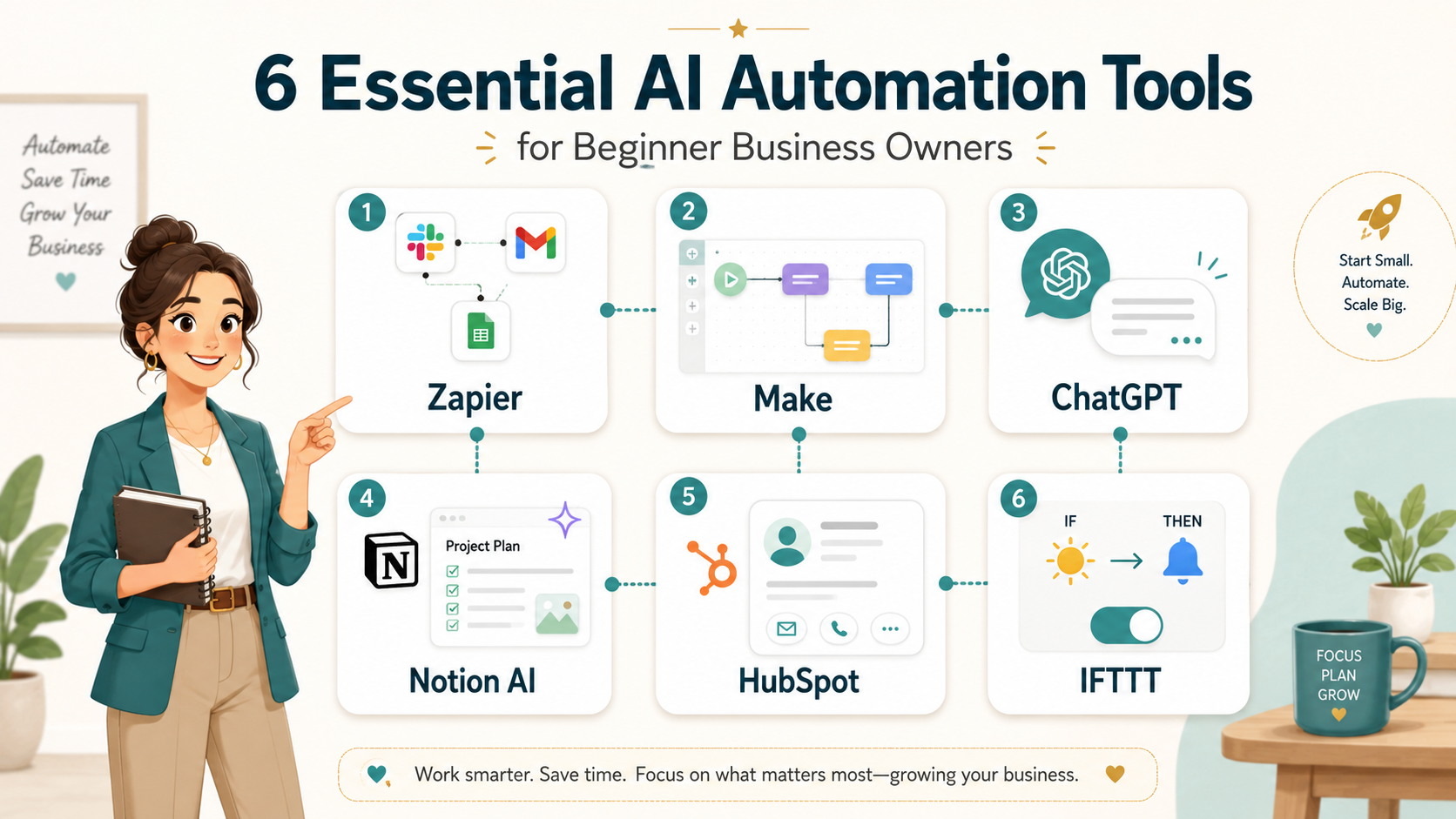
I have tested over a dozen AI automation tools, and I have selected the six that are best for beginners. Each tool has its own strengths, and the right one for you depends on your specific needs. I will break down the features, pros, and cons of each so you can compare them side by side. Remember, there is no single best tool. It is about finding the one that fits your workflow.
Tool 1: Zapier
Zapier is one of the most popular AI automation tools on the market. It connects different apps and automates tasks between them. For example, you can set it up so that when you receive a new email attachment, it automatically saves to your cloud storage. I have used Zapier for years, and it is incredibly reliable. It supports over 5,000 apps, so it works with almost everything you already use. The interface is straightforward, and you can create basic automations without any coding. For a beginner, this is a great starting point because you can learn the fundamentals of automation.
The main downside is that the free tier is limited. You can only run a certain number of tasks per month. If you need more volume, you will have to upgrade to a paid plan. But for a novice user, the free tier is usually enough to get started. I recommend Zapier if you want to connect different tools and automate simple workflows.
Tool 2: Make (formerly Integromat)
Make is a powerful alternative to Zapier. It offers more visual customization and is better for complex workflows. I personally prefer Make for projects that require multiple steps. The interface uses a visual canvas where you can drag and drop modules. This makes it easier to see the logic of your automation. For a beginner, it might look a bit intimidating at first, but the learning curve is not steep. Make also has excellent templates that you can use as a starting point.
One thing I like about Make is that it offers more flexibility in pricing. The free tier allows for a decent number of operations per month. It also has a generous trial period for paid plans. If you are a beginner who wants to grow into more complex automations, Make is a solid choice. It gives you room to expand without forcing you to switch tools later.
Tool 3: ChatGPT (by OpenAI)
ChatGPT is not a traditional automation tool, but it is incredibly useful for automating content creation. I use it to draft emails, write blog posts, and generate social media captions. The API version can be integrated into other workflows. For a beginner, the web interface is the easiest way to start. You simply type a prompt, and the AI generates text for you. It is like having a writing assistant available 24/7. I have found that it saves me hours of writing time every week.
The limitation is that ChatGPT requires clear instructions to produce good results. If you are vague, the output will be generic. But once you learn how to write effective prompts, it becomes an indispensable tool. I recommend ChatGPT for beginners who focus on content creation and marketing. It pairs well with other automation tools like Zapier.
Tool 4: Notion AI
Notion AI is built into the Notion workspace platform. It helps you automate note-taking, project management, and knowledge base creation. I use it to generate summaries of long documents and to brainstorm ideas. For a beginner, Notion AI is very intuitive because it is integrated into a tool you might already use. You do not need to learn a new interface. The AI features are accessible with a simple command.
The downside is that Notion AI is an add-on subscription. You need to pay extra on top of your Notion plan. But for someone who already uses Notion for organization, it is worth the cost. It turns your notes into a dynamic workspace. I recommend Notion AI for beginners who want to automate their personal productivity and content management.
Tool 5: HubSpot (Free CRM with AI Features)
HubSpot offers a free CRM that includes AI-powered automation tools. It is excellent for managing contacts, automating email marketing, and tracking sales. I have used HubSpot for client management, and the AI features help me prioritize leads. For a beginner, the free tier is very generous. You can automate follow-up emails, schedule meetings, and create simple workflows without paying anything. The interface is clean and easy to navigate.
The main drawback is that HubSpot is focused on sales and marketing. If you need automation for other areas like data entry or file management, it might not be the best fit. But for a beginner in business or coaching, it is a powerful tool. I recommend HubSpot if you want to automate your customer relationship processes.
Tool 6: IFTTT (If This Then That)
IFTTT is one of the simplest AI automation tools available. It uses a basic logic of triggers and actions. For example, you can set it so that if you post a photo on Instagram, it automatically saves to your phone. IFTTT is perfect for absolute beginners because it requires almost no setup. The app is mobile-friendly, so you can manage automations from your phone. I have used it for personal tasks like turning off lights when I leave home.
The limitation is that IFTTT is not as powerful as Zapier or Make. It is best for simple, single-step automations. For a novice user, this is actually a benefit. You can learn the basics without feeling overwhelmed. I recommend IFTTT for beginners who want to start with small, everyday automations.
Key Features to Look for in AI Tools
When I evaluate AI automation tools, I look for specific features that matter for beginners. The first is ease of use. A tool should have a clean interface with clear instructions. You should not need to watch a tutorial to complete a simple task. I always test the onboarding process. If I cannot set up a basic automation in 15 minutes, I consider it too complex for a novice.
Another key feature is integration support. Your automation tool needs to work with the apps you already use. I check for integrations with email platforms, cloud storage, and social media. The more integrations, the more versatile the tool is. For a beginner, this means you can automate tasks across your entire workflow without switching platforms. I recommend looking for tools that support at least 500 integrations.
Customization options are also important. While templates are great, you need the ability to tweak them. I look for tools that allow you to add conditions, filters, and multiple steps. This gives you control over how the automation runs. For example, you might want to send different emails depending on the time of day. A good tool will let you set that up easily. Beginners should start with templates, but having customization options allows you to grow.
Reliability is non-negotiable. Your automation should run consistently without errors. I always check user reviews and uptime statistics. If a tool has frequent outages, it will disrupt your workflow. For a beginner, this can be frustrating and discouraging. I recommend choosing established platforms with a proven track record. They are more likely to have stable servers and responsive support.
Customer support is another factor. As a beginner, you will have questions. I look for tools that offer live chat, email support, or a comprehensive knowledge base. Video tutorials are a bonus. I have found that platforms with active communities are also helpful. You can ask other users for advice. Good support makes the learning process much smoother.
Finally, consider the scalability of the tool. You might start with simple automations, but you will want to do more over time. I look for tools that offer advanced features like API access or custom scripting. You do not need these as a beginner, but having the option is valuable. It means you will not outgrow the tool. I recommend choosing a platform that offers tiered pricing so you can upgrade as your needs grow.
Pricing Options and Packages
Pricing is a critical factor for beginners. You do not want to spend a lot of money on a tool you are not sure about. The good news is that most AI automation tools offer free tiers. I have used these free versions to test the waters before committing. For example, Zapier offers a free plan with 100 tasks per month. That is enough for a novice to automate a few key workflows. Make offers 1,000 operations per month on its free plan, which is very generous.
ChatGPT offers free and paid plans, with paid plans usually providing access to more advanced models, higher limits, and extra features. For a beginner, the free version is usually sufficient. I used the free version for months before upgrading. Notion AI is an add-on that costs $10 per month per member. If you already use Notion, it is a reasonable expense.
HubSpot offers a free CRM with limited automation features. The paid plans start at $45 per month for the Starter tier. I recommend starting with the free version and upgrading only if you need more advanced features. IFTTT has a free plan that allows three applets (automations). The Pro plan costs $3.99 per month and allows unlimited applets. For a beginner, the free plan is a good starting point.
I have found that many beginners make the mistake of buying the most expensive plan right away. Do not do that. Start with the free tier and see if the tool fits your workflow. You can always upgrade later. Most platforms offer monthly billing, so you are not locked into a long-term contract. This gives you flexibility. I recommend setting a budget of $20 to $50 per month for your first tool. That is more than enough to get started.
One thing to watch out for is hidden costs. Some tools charge extra for premium integrations or advanced features. Read the pricing page carefully. I also look for annual discounts. Many platforms offer a 15% to 20% discount if you pay yearly. If you are sure you will use the tool for a year, this can save you money. But for a beginner, I suggest sticking with monthly payments until you are confident.
Let me share a personal example. I started with the free tier of Zapier. After a month, I realized I needed more tasks. I upgraded to the Starter plan at $19.99 per month. That plan lasted me for six months before I needed more. By then, I was comfortable with the tool and knew it was worth the investment. This gradual approach is ideal for beginners. You learn without financial pressure.
User Reviews and Testimonials
I always check user reviews before committing to a tool. They give you a realistic picture of what to expect. For Zapier, users consistently praise its reliability and vast app library. One user on G2 said, “Zapier saved me 10 hours a week on data entry. It is the backbone of my workflow.” I agree with that sentiment. The main complaint is that the free tier is too limited. But most users say the paid plans are worth it.
Make receives high marks for its visual interface. A user on Capterra wrote, “Make is more flexible than Zapier. I can create complex workflows that I could not do before.” Beginners sometimes find it intimidating, but the community is helpful. I have seen many users say that once they learned Make, they preferred it over other tools. The pricing is also praised for being fair.
ChatGPT has millions of positive reviews. Users love how it helps with writer’s block and content generation. A testimonial on OpenAI’s site says, “ChatGPT has become my brainstorming partner. It helps me generate ideas I would never have thought of.” The main criticism is that it can produce inaccurate information. I always remind beginners to fact-check the output. But for drafting and inspiration, it is unmatched.
Notion AI users appreciate the integration with their existing workspace. One reviewer said, “Notion AI turned my messy notes into a structured knowledge base. It is like having a personal assistant.” The extra cost is a common complaint, but most users feel it is justified. I have found that Notion AI is especially popular among coaches and content creators who need to organize a lot of information.
HubSpot’s free CRM has a strong reputation. Users on TrustRadius say, “The free version is incredibly generous. I was able to automate my email marketing without spending a dime.” The main downside is that the interface can feel cluttered. But for a beginner, the features outweigh the learning curve. I recommend HubSpot for anyone in sales or marketing.
IFTTT is beloved for its simplicity. A user on the App Store wrote, “IFTTT is perfect for non-techies. I set up an automation to backup my photos in minutes.” The limitation is that it is not powerful enough for business workflows. But for personal use, it is fantastic. Beginners who want to dip their toes into automation should start here.
Integrating AI Tools into Your Workflow
Integrating AI automation tools into your workflow does not have to be complicated. I recommend starting with one small task that you do every day. For example, if you manually send welcome emails to new subscribers, automate that first. Use a tool like Zapier or HubSpot to set up a trigger. When someone signs up, the tool sends the email automatically. This is a simple win that shows you the power of automation.
Once you have one automation running, look for other repetitive tasks. I suggest making a list of everything you do in a week. Highlight the tasks that are boring and take a lot of time. Those are the best candidates for automation. For me, it was social media scheduling. I used ChatGPT to generate posts and then connected it to a scheduling tool. Now I spend 30 minutes a week on something that used to take hours.
It is important to test your automations before relying on them. I always run a few manual tests to make sure the workflow works correctly. For example, if you set up an automation that sends an email when a form is submitted, submit the form yourself first. Check that the email arrives and looks right. This prevents embarrassing mistakes. I have learned this the hard way.
Another tip is to start with templates. Most tools offer pre-built templates for common tasks. I use these as a starting point and then customize them. This saves time and reduces errors. For example, Make has a template for automating lead capture. I tweaked it to fit my specific form fields. It took me 10 minutes instead of building from scratch.
Do not try to automate everything at once. That is a common mistake I see beginners make. You will get overwhelmed and give up. Instead, add one automation per week. Let it run for a few days to make sure it works. Then add another. This gradual approach builds your confidence. Within a month, you will have a handful of automations running smoothly. I have used this method with clients, and it always works.
Finally, keep monitoring your automations. They might break if an app updates or changes its API. I check my workflows once a month to make sure they are still running. Most tools send error notifications if something fails. Pay attention to those. A broken automation can cause missed tasks or lost data. Regular maintenance keeps your workflow reliable.
Future Trends in AI Automation for Beginners
Personalization is also becoming more sophisticated. AI tools are getting better at understanding your preferences. They can learn from your writing style, your work habits, your customer interactions, and your business goals. This means your automations will become more useful over time because they will feel less generic and more tailored to the way you actually work.
Another trend is the rise of AI agents. These are tools that can complete multi-step tasks with less manual input. Instead of simply saying, “When this happens, do that,” you may soon be able to say, “Research this topic, create a summary, draft an email, and schedule it for Friday.” The AI will handle more of the process for you. This will be especially helpful for beginners because it reduces the need to build complicated workflows from scratch.
We are also seeing more AI inside everyday business platforms. Email tools, project management apps, CRMs, design platforms, and website builders are adding AI features. This means beginners will not always need to sign up for separate automation tools. The tools they already use will start offering built-in AI support.
Voice-based automation is another trend to watch. Instead of clicking through menus, users will be able to give instructions in plain language. For example, you might say, “Send a follow-up email to everyone who downloaded my lead magnet this week,” and the system will help create or trigger that workflow. This will make automation feel much more natural for people who are not technical.
The most important trend is accessibility. AI automation is becoming simpler, cheaper, and more beginner-friendly. The tools that once required technical knowledge are now being designed for everyday users, solopreneurs, coaches, creators, retirees, and small business owners.
That is good news. It means you do not have to wait until you feel like an expert. You can start learning now with simple tools and small workflows.
Which Tool Should You Start With?
If you are brand new to automation, start with the tool that solves your most immediate problem.
If you want to connect different apps and automate simple business tasks, start with Zapier.
If you want a more visual workflow builder and plan to create more advanced automations later, try Make.
If your biggest need is writing, brainstorming, content creation, or email drafting, start with ChatGPT.
If you want to organize notes, projects, and ideas in one place, try Notion AI.
If you need help managing contacts, follow-ups, and customer relationships, start with HubSpot.
If you want the simplest possible trigger-and-action tool for personal or basic automations, try IFTTT.
Do not try to use all six tools at once. Pick one. Use it for one simple task. Once you feel comfortable, add another tool if you need it.
Conclusion
AI automation tools can feel overwhelming at first, but they become much easier when you start small. You do not need to understand every platform, feature, or technical term. You only need to know what task you want to simplify.
The six tools in this guide give beginners a practical starting point. Zapier and Make help you connect apps. ChatGPT helps you create and think faster. Notion AI helps you organize your work. HubSpot helps you manage customer relationships. IFTTT helps you build simple everyday automations.
The best tool is not always the most advanced one. The best tool is the one you will actually use.
Start with one repetitive task. Choose one beginner-friendly tool. Test one simple workflow. Then build from there.
Over time, these small automations can save hours, reduce stress, improve consistency, and help you build a smarter way of working.
Get our FREE resource – The AI Powered Online Business Toolkit
Also launching today – The Smart Content System
To see the full system:
 Read:
Read:
Systeme.io Review: All-in-One Business Platform
How to Start and Grow an Online Business Using AI
A Comprehensive Guide to Implementing AI-Powered Online Business Models
5 Easy AI Business Models for New Entrepreneurs
Top 7 Must-Have AI Tools for Successful Entrepreneurs
Top 10 Innovative AI Business Ideas to Kickstart Today
📅 Last updated:
