
A Comprehensive Guide to Beginner AI Automation Tools: Your First Steps to Smarter Workflows
I remember staring at my screen a few years ago, feeling completely overwhelmed. I had a to-do list that was a mile long, and I was spending hours on repetitive tasks that felt like they were sucking the life out of my day. That’s when I first stumbled onto the concept of AI automation. It sounded like science fiction, but it turned out to be the most practical thing I have ever learned. If you are a novice, the idea of using beginner AI automation tools might feel intimidating. I get it. But I am here to tell you that this technology is not just for tech wizards. It is for anyone who wants to reclaim their time and build something meaningful. This guide will walk you through everything you need to know, from the basic concepts to creating simple online income streams. Let’s get started.

Understanding Beginner AI Automation Tools
Before we dive into the specifics, we need to get a clear picture of what we are actually talking about. When I first heard the term AI automation, I pictured robots taking over the world. The reality is much more grounded and incredibly useful. AI automation tools are simply software programs that use artificial intelligence to perform tasks that would normally require human effort. Think of it like having a very smart, very fast assistant who never sleeps.
The core idea is to take repetitive, rule-based tasks and hand them off to a machine. This could be anything from sorting emails to generating social media posts. The “AI” part means the tool can learn from data and improve over time. It is not just following a static set of instructions. It is adapting. For a beginner, this is the key distinction. You are not programming a robot. You are teaching a system to handle the boring stuff so you can focus on the interesting stuff.
I have seen people use these tools to automate their entire morning routine. For example, they have an AI assistant that checks the weather, updates their calendar, and even drafts a quick to-do list for the day. It sounds like magic, but it is just a series of simple triggers and actions. The most common types of AI automation tools for beginners fall into a few categories. There are content generation tools that help you write copy. There are data entry tools that extract information from documents. There are also workflow tools that connect different apps together.
One thing I have learned is that you do not need to understand the underlying code. You just need to understand the input and the output. You tell the tool what you want it to do, and it figures out the rest. This is a huge shift from traditional automation, which required a lot of technical know-how. Now, you can set up complex automations with a few clicks. A study by McKinsey found that up to 60% of occupations have at least 30% of activities that could be automated. That is a massive opportunity for anyone willing to learn.
When I started, I was worried about the cost. I thought these tools would be expensive. But the market has exploded with affordable options. You can find free or low-cost tools that handle basic tasks. The key is to start small. Pick one task that you hate doing, and find a tool that can do it for you. I started with email sorting. It saved me about an hour a day. That hour added up fast.
How AI Differs from Traditional Automation
There is a big difference between a simple macro and true AI automation. A macro is a recording of your keystrokes. It does the same thing every single time. If something changes, the macro breaks. AI automation is different. It can handle variations. For example, a traditional tool might sort emails by sender name. An AI tool can sort emails by sentiment, urgency, or topic. It understands context. This is what makes it so powerful for beginners. You do not have to predict every possible scenario. The AI can figure it out.
Another difference is learning. Traditional automation is static. AI automation is dynamic. The more you use it, the better it gets. This is a huge advantage for building online income streams. If you are using a tool to generate content, it will learn your voice over time. If you are using it for customer service, it will learn the most common questions. This continuous improvement means your systems get more efficient without extra work from you.
Benefits of Beginner AI Automation Tools
I want to be honest with you. When I first started exploring AI automation tools for beginners, I was sceptical. I thought it was just another tech trend that would fizzle out. But the benefits I have experienced are real and tangible. The most obvious benefit is time savings. I used to spend hours on data entry. Now, I spend minutes. That time is not just freed up. It is redirected to higher-value activities like strategy and creative thinking.
For a beginner, time is often the biggest constraint. You are trying to learn a new skill, build a business, or manage a side hustle. You do not have hours to waste on repetitive tasks. AI automation gives you back those hours. According to a report from Accenture, AI can boost productivity by up to 40%. That is not a small number. That is a game-changer for someone just starting out.
Another major benefit is consistency. Humans get tired. We make mistakes. We have bad days. AI does not. Once you set up a workflow, it runs the same way every single time. This is crucial if you are trying to build a reputation for reliability. If you are running an online store, an AI tool can handle order confirmations and shipping updates without errors. Your customers get a consistent experience, and you do not have to worry about forgetting something.
Cost is another factor. Many beginners think they need to hire a virtual assistant to get help. That can be expensive. AI automation tools for beginners are often much cheaper. You can get a robust tool for $20 a month that does the work of a part-time employee. This allows you to scale your efforts without scaling your expenses. I have seen solo entrepreneurs run entire customer support operations using a single AI chatbot.
There is also the benefit of scalability. When you are doing everything manually, growth is hard. Every new customer means more work for you. With AI automation, you can handle more volume without adding more hours to your day. This is how you go from a side hustle to a full-time income. The system does the heavy lifting. You just have to steer the ship.
Finally, there is the learning curve. I know that sounds counterintuitive. But the best AI tools are designed to be user-friendly. They have drag-and-drop interfaces and pre-built templates. You do not need a degree in computer science. You just need to be willing to experiment. The fear of technology is the biggest barrier for most beginners. Once you get past that, you realize how accessible it really is.
Reducing Decision Fatigue
One benefit I did not expect was the reduction in decision fatigue. Every small decision you make during the day uses mental energy. By automating routine decisions, you save that energy for the important stuff. For example, I automated my social media posting schedule. Now, I do not have to decide when to post. The AI picks the optimal times based on engagement data. This might seem small, but it makes a difference. By the end of the day, I have more mental clarity.
Choosing the Right AI Tools for Your Needs
This is where a lot of beginners get stuck. There are hundreds of AI automation tools for beginners on the market. It is easy to get analysis paralysis. I have been there. You start researching, and suddenly you have twenty browser tabs open and no idea where to start. The key is to focus on your specific needs first. Do not look for the best tool. Look for the right tool for your specific problem.
Start by making a list of the tasks you do every day. Which ones are repetitive? Which ones take the most time? Which ones do you hate the most? That is your starting point. For me, it was email management. I was spending two hours a day just sorting through messages. I found a tool called SaneBox that uses AI to prioritize my inbox. It was a simple fix that had a huge impact.
If your focus is content creation, look at tools like Jasper or Copy.ai. These are designed to generate written content based on your prompts. They are great for blog posts, social media captions, and email newsletters. I use them to draft outlines and first drafts. It saves me hours of staring at a blank page. For data extraction, tools like Zapier or Make (formerly Integromat) are essential. They connect different apps and automate workflows between them.
Another important factor is ease of use. As a beginner, you want a tool that has a gentle learning curve. Look for tools with good tutorials, active communities, and responsive customer support. I always check the reviews on sites like G2 or Capterra before I buy. I want to see what other beginners are saying. If a tool is described as “complex” or “hard to set up,” I skip it.
Integration is another key consideration. Your AI tool should play nicely with the tools you already use. If you are using Gmail, Google Calendar, and Slack, you want a tool that integrates with those. Most modern tools have extensive integration libraries. Zapier, for example, connects to over 5,000 apps. This allows you to create powerful automations that touch every part of your workflow.
Pricing is obviously a factor. Many tools offer free tiers with limited features. This is perfect for testing. I always start with the free version to see if the tool fits my workflow. If it does, I upgrade to a paid plan. Do not be tempted to buy the most expensive plan right away. Start small and scale up as your needs grow. A $20 tool that you actually use is better than a $100 tool that sits unused.
Finally, consider the support and community. A tool with an active user community is invaluable. You can ask questions, share workflows, and learn from other people’s mistakes. I have learned more from community forums than from official documentation. Reddit, Facebook groups, and dedicated forums are great places to find real-world advice.
Evaluating Tool Capabilities
When you are comparing tools, look at the specific capabilities. Can it handle natural language processing? Does it have a visual builder? How accurate is its output? I like to test tools with a real task from my workflow. I give it a sample input and see what happens. This gives me a much better sense of its capabilities than any marketing page. For example, I tested a content generation tool by asking it to write a product description. The output was good, but it needed editing. That told me it was a time-saver, not a replacement.
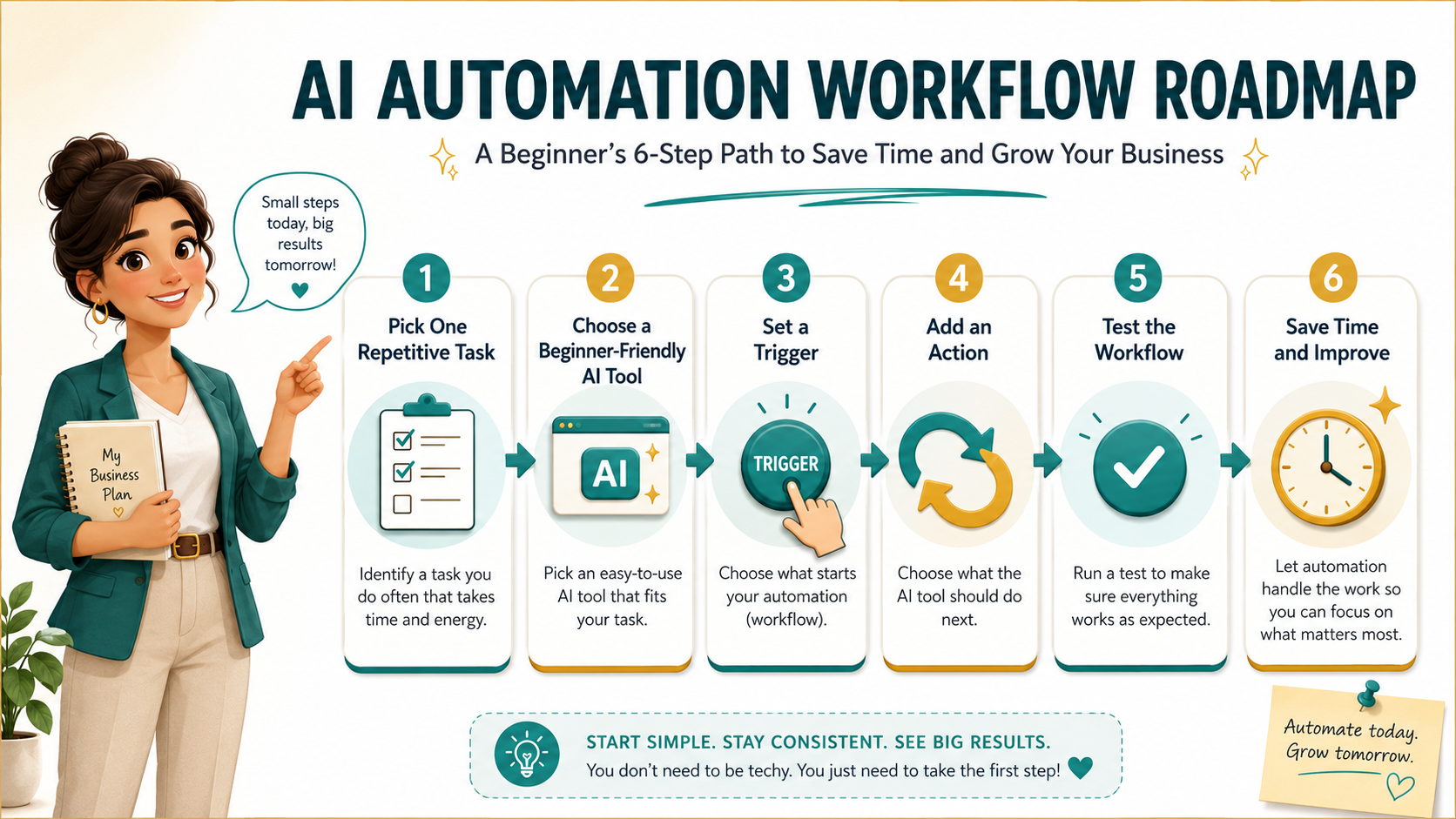
Step-by-Step Guide to Setting Up Beginner AI Automation Tools
Now we get to the practical part. I am going to walk you through how I set up my first AI automation. This is a simple workflow that you can adapt to your own needs. Remember, the goal is to start small and build confidence. You can always add more complexity later.
Step one is to identify a single task. Do not try to automate everything at once. Pick one thing that is repetitive and time-consuming. For this example, let us say you want to automate the process of saving email attachments to a cloud folder. This is a common task for freelancers who receive invoices or clients who receive files.
Step two is to choose your tool. For this task, I recommend Zapier. It is one of the most popular AI automation tools for beginners. It has a free tier that allows you to create up to 100 tasks per month. That is plenty for testing. Go to the Zapier website and create a free account. Do not worry about the complexity. The interface is designed for non-technical users.
Step three is to create a “Zap.” In Zapier, a Zap is an automation that connects two or more apps. You will start by choosing a trigger. The trigger is the event that starts the automation. In our case, the trigger is “New email in Gmail.” You will need to connect your Gmail account to Zapier. This is a one-time setup that takes about a minute.
Step four is to set up the action. The action is what happens after the trigger. We want to save the attachment. So we will choose the “Gmail” action called “Get Attachments.” Then we will choose a second action to save the file. We can use “Google Drive” as the destination. You will need to specify which folder to save the file to. You can even create a new folder for each sender.
Step five is to test the Zap. Zapier will run a test with a sample email. This is where you see if everything works. If the test is successful, you turn on the Zap. From that moment on, every time you get an email with an attachment, it will be automatically saved to your Google Drive. You do not have to do anything.
I remember the first time I turned on a Zap. I felt a little thrill. It was like having a tiny robot working for me. Over time, I built more complex Zaps. I connected my calendar to my to-do list. I automated my invoice reminders. Each one saved me a little bit of time. Over a month, those minutes added up to hours.
Troubleshooting Common Issues
Things will go wrong. That is normal. The most common issue is that the trigger does not fire correctly. This usually happens because of a permission issue. Make sure your app connections are still active. Another issue is formatting. Sometimes the output from one app does not match the input expected by another. This is where the test feature is your best friend. Run tests frequently and adjust the settings until it works. Do not get frustrated. Every failed test is a learning opportunity.
Creating Passive Income Streams with AI
This is the part that probably excites you the most. I know it excited me. The idea of making money while you sleep is the dream. And AI automation tools for beginners make it more achievable than ever. But let us be clear about what “passive” really means. It is not effortless. It requires upfront work to set up the systems. Once the systems are running, they generate income with minimal ongoing effort.
One of the simplest ways to create an online income stream with AI is through content creation. You can use AI tools to generate blog posts, eBooks, or social media content. Then you monetize that content through ads, affiliate marketing, or digital product sales. I have a friend who uses Jasper to write short eBooks on niche topics. He sells them on Amazon Kindle for $2.99. He spends about two hours per eBook. The AI does the bulk of the writing. He just edits and formats. He now has over 20 eBooks generating royalties every month.
Another popular model is using AI for customer service. You can set up a chatbot on your website that answers common questions. This allows you to run an online store or a service business without being available 24/7. The chatbot handles the simple inquiries, and you only step in for complex issues. This frees you up to focus on marketing and product development. I have seen people run successful drop shipping stores using this exact model.
Affiliate marketing is another great option. You can use AI to curate product recommendations and write reviews. The AI can analyse product data and generate comparison charts. You then embed affiliate links in your content. Every time someone clicks and buys, you earn a commission. There are tools that can even automate the posting of this content to social media platforms. This creates a fully automated sales funnel.
I also want to mention online courses. You can use AI to help structure your course content, generate quizzes, and even create video scripts. Once the course is built and hosted on a platform like Udemy or Teachable, it can generate income for years. The AI handles the heavy lifting of content creation. You handle the subject matter expertise. It is a powerful combination.
Data entry and processing is another area. There are platforms where you can offer data processing services. You use AI tools to clean, sort, and analyse data for clients. The AI does the work, and you collect the payment. This is a great way to start if you have a specific skill like bookkeeping or market research. The AI makes you faster and more accurate, which means you can take on more clients.
The key to all of these models is leverage. You are using AI to multiply your efforts. One person with AI can do the work of a small team. This is how you build scalable online income streams. Start with one model, master it, and then expand. Do not try to do everything at once. I started with a single affiliate site. Once that was generating consistent income, I added a second. Now I have a small portfolio of automated income streams.
Real-World Example: The AI-Powered Newsletter
Let me give you a specific example. I know a person who runs a niche newsletter about vintage cameras. He uses AI to research topics, draft the newsletter, and even generate images. He then uses an automation tool to schedule the emails and track open rates. He monetizes the newsletter through affiliate links to camera equipment and sponsored content. He spends about three hours a week on it. The newsletter generates around $1,500 a month. That is a solid side income from a few hours of work.
Joining The Opportunity Lab Community
I have learned a lot on my own, but I have learned even more from being part of a community. When you are exploring AI automation tools for beginners, having a support system is invaluable. That is why I want to tell you about The Opportunity Lab. It is a community specifically designed for people who are building online income streams with AI and automation.
The community is full of people at all stages of the journey. There are complete novices who are just starting to explore. There are experienced entrepreneurs who have been doing this for years. Everyone shares their wins, their failures, and their tips. This is not a place where people gatekeep their knowledge. It is a place of open sharing and collaboration.
One of the best features is the library of pre-built workflows. Members share the exact automations they use. You can import these workflows into your own tools and adapt them to your needs. This saves you hours of trial and error. I have used workflows from the community for social media scheduling, lead generation, and customer follow-ups. Each one was a shortcut to success.
There are also regular live sessions where experts walk you through specific strategies. These are not sales pitches. They are practical, hands-on tutorials. I attended a session on using AI for email marketing. The presenter showed us exactly how to set up a sequence that converts. I implemented it the next day, and my open rates went up by 20%.
The community also has a job board where members post opportunities. If you are looking to start a side hustle, this is a goldmine. You can find clients who need help with automation, content creation, or data processing. The rates are fair, and the clients are vetted by the community. It is a safe place to find your first gig.
If you are serious about building online income streams, I highly recommend joining. The cost is minimal compared to the value you get. The accountability alone is worth it. When you are surrounded by people who are taking action, it motivates you to take action too. You can find more information and join by visiting The Opportunity Lab community.
Why Community Matters for Beginners
When I started, I felt isolated. I did not know anyone else who was doing this. The community changed that. I had people to ask questions when I got stuck. I had people to celebrate with when I hit a milestone. That social support is crucial for staying motivated. Building online income streams is a marathon, not a sprint. Having a community makes the journey much more enjoyable.
Utilizing Free Resources for AI Beginners
You do not need to spend a lot of money to get started. There are tons of free resources that can teach you everything you need to know about AI automation tools for beginners. I have compiled a list of my favourites. These are the resources I used when I was starting out, and they are still valuable today.
First, YouTube is your best friend. There are countless channels dedicated to AI and automation. I recommend channels like “The AI Advantage” and “Matt Wolfe.” They break down complex topics into simple, actionable videos. They also review the latest tools and give honest opinions. I have learned more from YouTube than from any paid course.
Second, take advantage of free trials. Almost every AI tool offers a free trial. Sign up for as many as you can. Use the trial period to test the tool with your own tasks. This is the best way to determine if a tool is right for you. I keep a spreadsheet of the tools I have tried, with notes on what I liked and did not like. This helps me make informed decisions later.
Third, there are free educational platforms like Coursera and edX. They offer courses on AI and automation from top universities. Many of these courses are free to audit. You can learn the theory behind the technology without spending a dime. I took a free course on machine learning from Stanford. It gave me a solid foundation that helped me understand how the tools work.
Fourth, do not underestimate the power of documentation. The official documentation for tools like Zapier and Make is excellent. It is written for non-technical users. It includes step-by-step guides and video tutorials. When I am stuck on a specific workflow, I often search the help centre before looking anywhere else. Most of the time, the answer is already there.
Fifth, join free communities and discussion groups. Many AI tools have Facebook groups, Reddit communities, Discord servers, and user forums. These are helpful because you can see real people asking real questions. You can learn from their mistakes and discover shortcuts that are not always covered in official tutorials.
Sixth, use free templates. Tools like Zapier, Make, Canva, Notion, and many email platforms offer pre-built templates. These are perfect for beginners because you do not have to start from a blank page. You can choose a template, customize it, and learn how the workflow works as you go.
The most important thing is to avoid resource overload. You do not need to watch twenty tutorials or download fifty templates before you begin. Choose one simple task, one tool, and one tutorial. Follow it all the way through. Once you complete your first automation, your confidence will grow quickly.
Your First 7-Day AI Automation Starter Plan
If you are brand new to AI automation, here is a simple plan you can follow.
Day 1: Make a list of repetitive tasks you do every week.
Day 2: Choose one task that feels simple and low risk.
Day 3: Pick one beginner-friendly tool such as Zapier, Make, ChatGPT, Canva, or an email platform.
Day 4: Watch one short tutorial or use a pre-built template.
Day 5: Build your first simple workflow.
Day 6: Test it and fix anything that does not work.
Day 7: Let it run and track how much time it saves you.
This is how you begin. Not with a huge system. Not with ten tools. Just one small workflow that removes one repetitive task from your day.
Conclusion
AI-powered automation can feel intimidating at first, but it becomes much easier when you start small. You do not need to understand complicated technology. You only need to understand what task you want to simplify and what result you want the system to create.
The best place to begin is with one repetitive task. Maybe it is sorting emails, saving attachments, scheduling social media posts, sending follow-up messages, organizing files, or drafting content ideas. Once you automate one small task, you start to see what is possible.
Over time, those small automations become a smarter workflow. They save you time, reduce decision fatigue, improve consistency, and give you more space to focus on creative work, strategy, customers, and income-building activities.
AI automation is not about replacing your ideas or your judgment. It is about giving you support. It helps you do the boring work faster so you can spend more energy on the work that matters.
Start with one tool. Build one workflow. Test it. Improve it. Then add the next one.
That is how smarter workflows begin.
Get our FREE resource – 60-minute List Builder
To see the full system:
 Read:
Read:
Systeme.io Review: All-in-One Business Platform
How to Start and Grow an Online Business Using AI
A Comprehensive Guide to Implementing AI-Powered Online Business Models
5 Easy AI Business Models for New Entrepreneurs
Top 7 Must-Have AI Tools for Successful Entrepreneurs
Top 10 Innovative AI Business Ideas to Kickstart Today
📅 Last updated:
