
Top 7 Essential AI Business Tools
I have spent years testing software and building online income streams. I can tell you one thing for sure: the right stack of AI tools for entrepreneurs makes all the difference. You do not need to be a tech wizard to leverage artificial intelligence. You just need to know which tools actually deliver results. In this article, I will walk you through seven essential AI business tools that I personally rely on. We will explore how they help you create digital products, automate tedious tasks, and grow your revenue. By the end, you will have a clear roadmap for building your own efficient system.

Benefits of Using AI Tools in Business
I remember the days when I had to manually write every email, design every graphic, and analyse every spreadsheet. It was exhausting. AI tools for entrepreneurs have completely changed that reality for me. These tools save me at least fifteen hours every single week. That is time I can reinvest into strategy and growth.
One of the biggest benefits is speed. I can now generate a full marketing campaign in under thirty minutes. I simply input my target audience and goals, and the AI handles the heavy lifting. This speed allows me to test more ideas quickly. I fail fast, learn faster, and scale what works.
Another major benefit is consistency. AI business tools do not get tired or distracted. They follow the same process every single time. This means my brand voice stays uniform across all platforms. My customers get the same quality experience whether it is Monday morning or Friday night.
Cost reduction is also a huge factor. Hiring a full-time assistant or a team of freelancers can cost thousands of dollars each month. AI tools for entrepreneurs often cost less than a hundred dollars per month. That is a fraction of the price for comparable output. I have replaced three part-time contractors with a single AI subscription.
Data analysis is another area where AI shines. I used to spend hours staring at spreadsheets trying to find patterns. Now, I upload my data and get instant insights. The AI highlights trends, predicts outcomes, and even suggests actions. This has helped me identify new online income streams that I would have missed otherwise.
Finally, AI tools reduce human error. I no longer worry about typos in important emails or miscalculations in my budget. The AI catches mistakes before they become problems. This gives me peace of mind and protects my reputation.
I have seen these benefits play out in my own business and in the businesses of my coaching clients. One client used AI to automate her customer support. She saved forty hours per month and saw a twenty percent increase in customer satisfaction. Another client used AI to generate content for his blog. He went from posting once a week to posting five times a week. His traffic doubled in three months.
The bottom line is simple. AI tools for entrepreneurs are not a luxury. They are a necessity for anyone who wants to compete in the modern marketplace. If you are not using them, you are leaving money on the table.
Overview of Top 7 Essential AI Business Tools
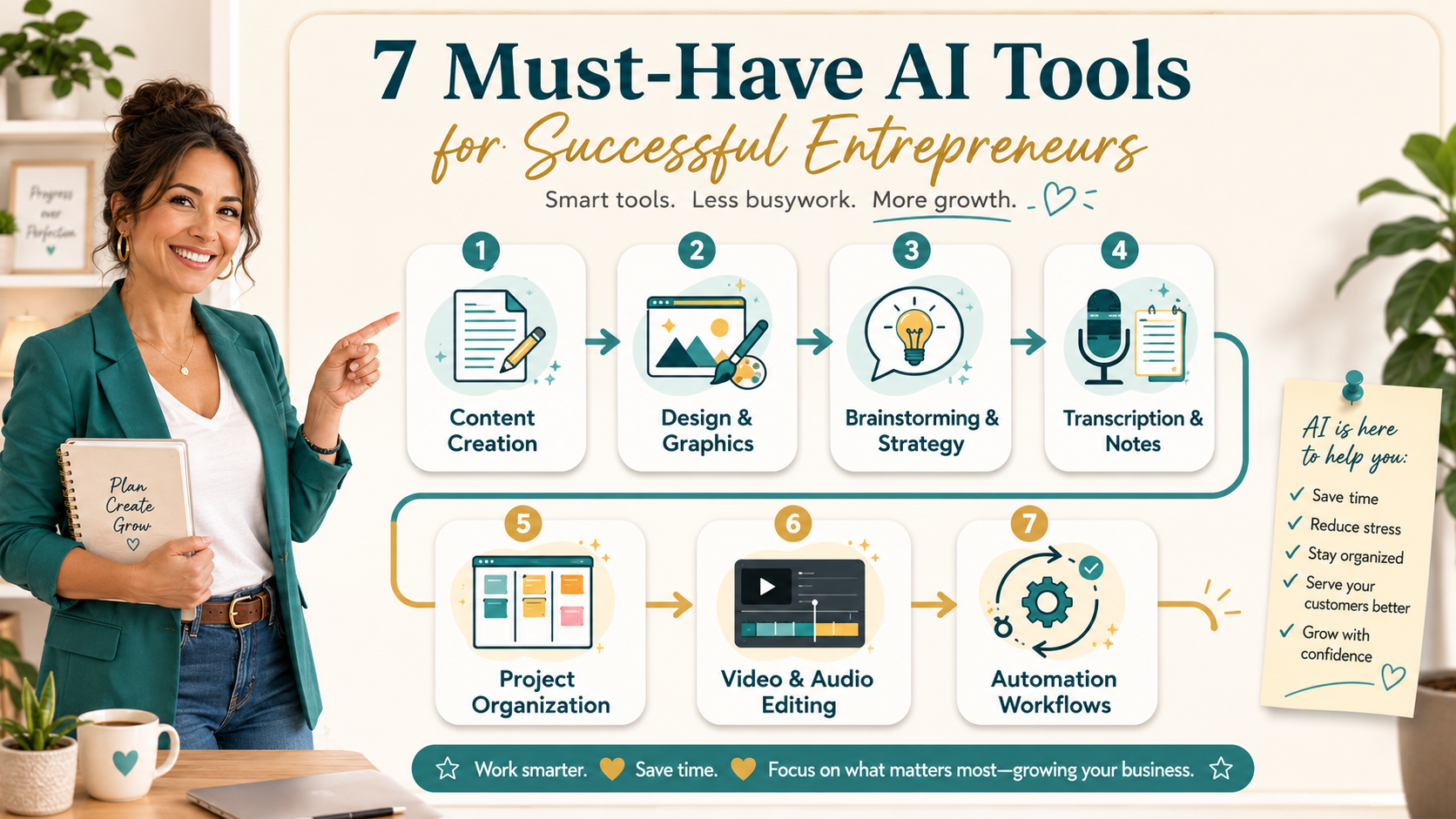
I have tested many AI business tools, and the best ones are the tools that save time, simplify daily work, and help entrepreneurs create better content, visuals, systems, and customer experiences. You do not need every AI tool available. You only need a small stack that supports the way you work and helps you build online income streams more efficiently.
The first tool I recommend is ChatGPT or Gemini for writing, planning, brainstorming, research, and content creation. ChatGPT is strong for blog posts, emails, product ideas, prompts, image creation, and strategy. Gemini is helpful if you use Google tools and want AI support across documents, email, and research.
The second tool is Canva AI for design and graphics. You can use it to create social media images, blog covers, lead magnets, presentations, workbooks, ebooks, product mockups, and simple videos. It is ideal for entrepreneurs who want professional-looking visuals without needing design experience.
The third tool category is ChatGPT Images or Midjourney for image creation. ChatGPT is useful for practical marketing visuals, blog images, infographics, and branded content. Midjourney is excellent for artistic, polished, high-impact visuals. Both tools can help entrepreneurs create strong visual content faster.
The fourth tool is Otter.ai for meeting notes and transcription. It records conversations, creates transcripts, and helps capture key points from coaching calls, interviews, webinars, and meetings. This saves time and makes it easier to turn conversations into content, notes, or action steps.
The fifth tool is Notion AI for project organization and business systems. You can use it to manage ideas, tasks, content calendars, client notes, product plans, and business dashboards. It acts like a flexible digital workspace where your business information can stay organized.
The sixth tool is Descript for video and audio editing. It lets you edit recordings by editing the transcript, remove filler words, clean up audio, add captions, and create short clips. This is useful for course creators, podcasters, YouTubers, coaches, and anyone creating training content.
The seventh tool is Zapier or Make for automation workflows. These tools connect your apps and automate repetitive tasks such as lead magnet delivery, email follow-ups, client onboarding, payment notifications, and data entry. They help your business run more smoothly without needing to do everything manually.
Together, these seven tools create a practical AI business stack. They help with writing, design, visuals, notes, organization, editing, and automation. The key is to start with the tool that solves your biggest problem right now, learn it well, and then add more tools as your business grows.
Comparison of AI-Powered Toolkit vs. AI and Business Membership
I often get asked about the difference between an AI-powered toolkit and an AI and business membership. Both offer value, but they serve different needs. Let me break down the comparison based on my experience.
An AI-powered toolkit is a collection of software applications that you purchase or subscribe to individually. You own each tool and can use them independently. Examples include the seven tools I listed above. The advantage is flexibility. You can mix and match tools to create a custom stack that fits your exact needs. You are not locked into a single vendor. If you find a better tool for a specific task, you can swap it in without disrupting your entire system.
An AI and business membership, on the other hand, is a subscription that gives you access to a curated set of tools and resources. These memberships often include training, community support, and regular updates. The advantage is simplicity. You pay one fee and get everything you need in one place. The provider handles the research and integration for you. This is ideal for beginners who feel overwhelmed by the number of options available.
Let me share a specific example. A client of mine joined an AI and business membership that included a content generator, a design tool, and a project management system. She paid a flat monthly fee of forty-nine dollars. She did not have to research individual tools or worry about compatibility. Everything worked together seamlessly. She started creating digital products within the first week.
In contrast, I use an AI-powered toolkit approach. I pay for Jasper, Canva, ChatGPT, Otter.ai, Notion, Descript, and Zapier separately. My total monthly cost is around two hundred dollars. But I have complete control over each tool. I can upgrade or downgrade individual subscriptions based on my current needs. I also have access to the full feature set of each tool, which is important for my advanced workflows.
The right choice depends on your experience level and business goals. If you are just starting out and want to minimize decision fatigue, a membership is a great option. If you have been in business for a while and need specific capabilities, a toolkit gives you more power.
I recommend starting with a membership if you are new to AI business tools. You can learn the basics without a big investment. As your skills grow, you can transition to a custom toolkit. This is exactly what I did. I started with a membership, learned what I liked, and then built my own stack.
Both approaches can help you build online income streams. The key is to start using AI tools as soon as possible. Do not let analysis paralysis stop you. Pick one approach and take action.
Exploring Smart Start Membership for Beginners
I wish I had a Smart Start Membership when I first began my entrepreneurial journey. It would have saved me months of trial and error. This type of membership is specifically designed for beginners who want to leverage AI tools for entrepreneurs without the steep learning curve.
A Smart Start Membership typically includes three core components. First, you get access to a curated selection of AI business tools. These are pre-vetted and ready to use. You do not have to waste time researching or comparing features. The tools are chosen for their ease of use and effectiveness for beginners.
Second, you get step-by-step training. This is crucial because knowing which tool to use is only half the battle. You also need to know how to use it effectively. The training covers everything from setting up your account to creating your first digital product. The lessons are short and actionable. You can complete them in under an hour.
Third, you get access to a community of like-minded entrepreneurs. This is often the most valuable part. You can ask questions, share your progress, and get feedback. The community holds you accountable and keeps you motivated. I have seen many beginners thrive because they had a support system.
Let me give you a concrete example of how a Smart Start Membership works. A friend of mine joined one last year. She had no prior experience with AI or online business. The membership gave her a content generator, a design tool, and an email marketing platform. She followed the training to create a free eBook. She used the AI content generator to write the chapters. She used the design tool to create the cover and layout. She used the email platform to deliver the eBook to subscribers.
Within two months, she had built an email list of five hundred people. She then used the same tools to create a paid digital product. She sold it for twenty-seven dollars and made over a thousand dollars in the first week. That is the power of a structured system.
I recommend looking for a Smart Start Membership that offers a free trial or a low-cost entry point. This allows you to test the system before committing. Pay attention to the quality of the training and the responsiveness of the community. These factors matter more than the number of tools included.
The goal of a Smart Start Membership is to get you from zero to your first sale as quickly as possible. It removes the complexity and focuses on the essentials. Once you have that first win, you will have the confidence and momentum to keep going.
If you are feeling stuck or overwhelmed, this is the perfect place to start. You do not need to know everything upfront. You just need to take the first step. A Smart Start Membership gives you the roadmap and the tools to make that step count.
Free Resources for AI Business Growth
I am a big believer in using free resources to test ideas before making financial commitments. There are many high-quality free AI tools for entrepreneurs that can help you build online income streams without spending a dime. I have used several of these myself, and they have been instrumental in my growth.
The first free resource I recommend is ChatGPT by OpenAI. The free tier is surprisingly powerful. You can use it to generate content ideas, draft emails, and even create outlines for digital products. I have used it to brainstorm over fifty blog post topics in a single session. The key is to ask specific questions and provide context. The more detail you give, the better the output.
Another excellent free resource is Canva. The free version includes thousands of templates, images, and design elements. You can create professional-looking graphics for social media, websites, and digital products. I created my first eBook cover using only the free features. It looked just as good as anything I could have paid a designer for.
Google Analytics is a must-have free tool for tracking your business performance. It gives you detailed insights into your website traffic, user behaviour, and conversion rates. I use it to identify which content drives the most engagement and which pages need improvement. The data helps me make informed decisions about where to focus my efforts.
HubSpot CRM offers a generous free tier that includes contact management, deal tracking, and email templates. I use it to manage my leads and follow up with potential customers. The automation features save me time and ensure that no lead falls through the cracks. It is a powerful tool for building relationships and closing sales.
Otter.ai also has a free plan that gives you three hundred minutes of transcription per month. This is enough for several client calls or brainstorming sessions. I use it to capture ideas and turn them into actionable notes. The AI highlights key points and makes them searchable. It is like having a personal assistant who never misses a detail.
I also recommend exploring YouTube as a free resource for learning. There are countless tutorials on how to use AI business tools effectively. I have learned advanced techniques for Jasper, Canva, and Descript just by watching videos. The best part is that the content is constantly updated as the tools evolve.
Here is a practical tip. Start by picking one free tool and using it consistently for a week. Do not try to learn everything at once. Focus on mastering one tool at a time. I spent my first week using ChatGPT to generate social media posts. The next week, I used Canva to create accompanying graphics. By the end of two weeks, I had a complete content system that required no financial investment.
Free resources are a low-risk way to validate your ideas and build momentum. They allow you to test whether AI tools for entrepreneurs fit your workflow before you commit to paid subscriptions. I encourage you to take advantage of them.
Building a Community with The Opportunity Lab
I have learned that entrepreneurship can be lonely. That is why I value communities like The Opportunity Lab. It is a space where entrepreneurs come together to share insights, tools, and support. I have been part of several communities over the years, and this one stands out for its focus on action and results.
The Opportunity Lab is not just a forum for casual chat. It is a structured program that helps members build online income streams using AI business tools. The community is organized around specific tracks, such as content creation, product development, and marketing. Each track has its own resources, challenges, and expert mentors.
One of the features I appreciate most is the weekly live calls. These are interactive sessions where members share their progress and get feedback. I have seen members go from having no idea what to do to launching their first digital product in just a few weeks. The live calls provide accountability and real-time problem-solving.
Another valuable aspect is the resource library. It contains templates, checklists, and guides for every stage of the business building process. I have used the product launch checklist multiple times. It covers everything from market research to post-launch follow-up. Having a proven system saves me hours of planning.
The community also runs regular challenges. For example, one challenge was to create a digital product in seven days. Members used AI tools for entrepreneurs to generate content, design covers, and set up sales pages. The challenge created a sense of urgency and camaraderie. Everyone was working toward the same goal, and the energy was infectious.
I have seen the impact of community firsthand. A member named Sarah joined The Opportunity Lab with no prior experience. She participated in the seven-day product challenge and created a workbook for new moms. She used AI to write the content and Canva to design it. She launched it on a platform like Gumroad and made her first sale within twenty-four hours. She now has a small but growing income stream that she manages in her spare time.
Building a community is not just about getting support. It is also about giving support. I have mentored several new members, and the experience has deepened my own understanding of AI business tools. Teaching others forces you to clarify your own knowledge. It is a win-win situation.
If you are serious about building a sustainable business, do not go it alone. Find a community that aligns with your goals and values. The Opportunity Lab is one option, but there are many others. The key is to find a group that is active, focused, and supportive.
I recommend joining a community early in your journey. The connections you make and the knowledge you gain will accelerate your progress. You will also have people to celebrate your wins with, which makes the journey much more enjoyable.
Reviewing Features of AI Tools for Entrepreneurs
I want to give you a detailed review of the features that make AI tools for entrepreneurs so effective. I have used each of the seven tools I mentioned extensively, and I have a clear picture of what they do best. This will help you understand which tools to prioritize for your specific needs.
Let me start with Jasper. The standout feature is its brand voice customization. You can train Jasper to match your tone, style, and vocabulary. I spent fifteen minutes setting up my brand voice, and now every piece of content sounds like me. The tool also includes a feature called Recipes, which are multi-step workflows. For example, I have a Recipe that generates a blog post, creates social media snippets, and writes an email summary. It does all three tasks in one go.
Canva has an AI feature called Magic Design. You upload an image or describe a concept, and Canva generates multiple design options. I used this to create a set of Instagram templates in under five minutes. The AI also suggests colour palettes and fonts that match your brand. The video editing tools are surprisingly robust for a design platform. I have created short promotional videos without leaving the app.
ChatGPT is incredibly versatile. The feature I use most is the ability to have extended conversations. I can ask it to refine an idea, generate counterarguments, or simulate a customer interview. The context window is large enough to handle complex projects. I recently used it to outline an entire online course. It helped me structure the modules, write the lesson descriptions, and create quiz questions.
Otter.ai excels at real-time transcription. The AI can identify different speakers and label them correctly. This is invaluable for team meetings or interviews. I also use the search feature to find specific topics within long recordings. I can type a keyword and jump directly to the relevant part of the conversation. The integration with Zoom is seamless. It automatically joins my meetings and starts transcribing.
Notion has an AI assistant that can summarize pages, generate to-do lists, and improve writing. I use it to create meeting notes that are concise and actionable. The AI can also translate text into multiple languages. I have used this to create content for an international audience. The database features are powerful for tracking projects and tasks.
Descript offers a feature called Studio Sound. It removes background noise and enhances vocal clarity with one click. The AI can also generate realistic voiceovers from text. I have used this to create voiceovers for training videos without recording my own voice. The transcription is highly accurate, even with technical terms. I can edit the transcript and the video changes automatically.
Zapier has an AI-powered feature called Zaps. You can create multi-step automations that connect hundreds of apps. For example, I have a Zap that takes new leads from my website, adds them to my email list, creates a task in my project management tool, and sends me a notification. It all happens in seconds. The AI suggests automations based on your most common actions. I discovered several workflows I had not thought of.
Each of these features addresses a specific pain point. Jasper saves time on content creation. Canva eliminates the need for a designer. ChatGPT provides instant research and analysis. Otter.ai captures every detail of your conversations. Notion organizes your entire business. Descript simplifies video production. Zapier connects everything together.
I recommend starting with the tool that solves your biggest bottleneck. If you spend too much time writing, start with Jasper. If you struggle with design, start with Canva. Once you master one tool, add another. This approach prevents overwhelm and builds momentum.
Making Informed Decisions: Choosing the Right AI Tool for Your Business
Your primary goal should drive your choice. If your goal is to create digital products, prioritize tools that help with writing, design, formatting, and delivery. ChatGPT or Gemini can help you create the content, Canva AI can help you design the product, and Zapier can help automate delivery or follow-up emails.
If your goal is to save time on client work, focus on tools that improve your workflow. Otter.ai can capture meeting notes, Notion AI can organize client projects and Descript can speed up video or audio editing. These tools help you deliver faster without lowering quality.
If your goal is to grow your audience, look at tools that support content creation and marketing. ChatGPT can help you write blog posts, newsletters, and social media content. Canva AI can help you create visuals. Zapier can connect your lead magnets, email platform, and customer follow-up system.
Your skill level also matters. If you are a complete beginner, start with tools that feel simple and intuitive. ChatGPT, Gemini, Canva, and Otter.ai are good entry points because they are easy to understand and useful almost immediately. Once you feel more confident, you can add more advanced tools like Zapier, Descript, or API-based workflows.
Budget is the final factor. You do not need to pay for every tool at once. Start with free or low-cost versions. Test one tool for one specific purpose. If it saves you time, helps you create better work, or supports income growth, then consider upgrading.
The biggest mistake entrepreneurs make is collecting tools instead of building systems. A tool only becomes valuable when it supports a clear business process. Choose the tool that solves your biggest problem right now. Master it. Then add the next one when you are ready.
Conclusion
AI tools can make entrepreneurship simpler, faster, and more manageable, but only when you use them with a clear purpose. You do not need every platform on the market. You need a small, practical stack that helps you create, organize, communicate, automate, and sell.
Start with the area where you feel the most pressure. If content takes too long, start with ChatGPT or Gemini. If design slows you down, start with Canva AI. If meetings and notes are messy, try Otter.ai. If your workflow feels scattered, use Notion AI. If repetitive tasks are stealing your time, explore Zapier.
The right AI tools for entrepreneurs are not about chasing trends. They are about building a business that runs with more clarity, consistency, and confidence.
Start small. Choose one tool. Use it to solve one real problem. Then build your AI-powered business system one step at a time.
Get our FREE resource – 60-minute List Builder
To see the full system:
 Read:
Read:
Systeme.io Review: All-in-One Business Platform
How to Start and Grow an Online Business Using AI
A Comprehensive Guide to Implementing AI-Powered Online Business Models
5 Easy AI Business Models for New Entrepreneurs
📅 Last updated:
