
A Comprehensive Guide to Developing Simple AI Apps with No Coding Required
Have you ever dreamed of creating your own AI application but felt held back because you don’t know how to code? I’ve been there, and I’m here to tell you that it’s entirely possible to bring your ideas to life without writing a single line of code. In this guide, I’ll walk you through everything you need to know about developing AI apps without coding, using tools that are designed for beginners like you and me. We’ll explore the best platforms, step-by-step processes, and insider tips to make your journey smooth and successful. By the end, you’ll have the confidence and knowledge to start building your own AI solutions today.

Understanding No-Code AI Development
No-code AI development is a revolutionary approach that allows anyone to create artificial intelligence applications using visual interfaces and pre-built components instead of traditional programming. It democratizes access to AI technology, making it possible for entrepreneurs, marketers, and creators to implement smart solutions without needing a background in computer science. The core idea is to simplify complex processes through drag-and-drop tools, enabling you to focus on your application’s purpose rather than the technical intricacies.
One of the biggest misconceptions about no-code AI is that it’s limited or less powerful than coded alternatives. In reality, many no-code platforms leverage the same advanced algorithms and machine learning models that developers use, but they abstract away the complexity. For instance, you can build chatbots, image recognition systems, or predictive analytics tools by configuring ready-made modules. This means you’re not sacrificing capability for convenience; you’re just accessing it in a more user-friendly way.
The benefits of adopting no-code for AI applications are substantial. First, it drastically reduces development time. What might take a team of developers weeks or months can often be accomplished in days or even hours. Second, it lowers costs significantly since you don’t need to hire expensive programmers. Third, it encourages experimentation. You can quickly prototype ideas, test them with real users, and iterate based on feedback without a major investment. This agility is crucial in today’s competitive landscape where speed to market can make or break a project.
Industries across the board are embracing no-code AI development. From healthcare apps that predict patient outcomes to e-commerce platforms that personalize shopping experiences, the applications are endless. A great example is a small business owner using a tool like IBM Watson to analyze customer feedback and improve service quality without any technical team. This accessibility is transforming how we think about innovation and who can participate in it.
As you dive deeper, you’ll discover that no-code platforms often include features like data integration, automation workflows, and deployment options that make the entire process seamless. They handle the underlying infrastructure, updates, and scalability, so you can concentrate on designing an AI solution that meets your specific needs. Understanding this foundation is the first step toward successfully developing AI apps without coding, and it opens up a world of possibilities for your projects.
Exploring Beginner-Friendly AI Tools
When starting your journey in developing AI apps without coding, choosing the right tool is critical. The market is filled with options, but I’ve found that a few stand out for their ease of use, powerful features, and strong community support. These platforms are designed with beginners in mind, offering intuitive interfaces and comprehensive guides to help you get started quickly. Let’s take a closer look at some of the best beginner-friendly AI tools available today.
First up is Bubble, a versatile no-code platform that supports AI integration through plugins and APIs. With Bubble, you can build web applications that incorporate machine learning models for tasks like sentiment analysis or recommendation engines. Its visual editor allows you to design workflows without coding, and there’s a wealth of tutorials to guide you. Many users have created successful AI-driven apps, such as personalized learning platforms or customer service chatbots, showcasing its flexibility.
Another excellent option is Adalo, which specializes in mobile app development. Adalo makes it simple to add AI features like image recognition or natural language processing through integrations with services like Google Cloud AI. I love how it enables you to prototype an app in minutes and test it on your phone immediately. For someone new to no-code development, this instant gratification can be incredibly motivating and helps you learn through doing.
For those focused on automation and data, Zapier is a powerhouse. While not exclusively an AI tool, Zapier connects with numerous AI services, allowing you to automate tasks between apps without any coding. You can set up workflows that, for example, use AI to categorize emails or generate reports based on data triggers. Its user-friendly interface and extensive app directory make it a go-to for beginners looking to dip their toes into AI applications.
When evaluating these tools, consider factors like pricing, scalability, and support. Most offer free tiers or trials, so you can experiment before committing. Look for platforms with active communities and learning resources, as these will be invaluable as you grow your skills. Remember, the goal is to find a tool that aligns with your project needs and comfort level, enabling you to focus on creativity rather than technical hurdles.
Step-by-Step Guide to Building Your First AI App
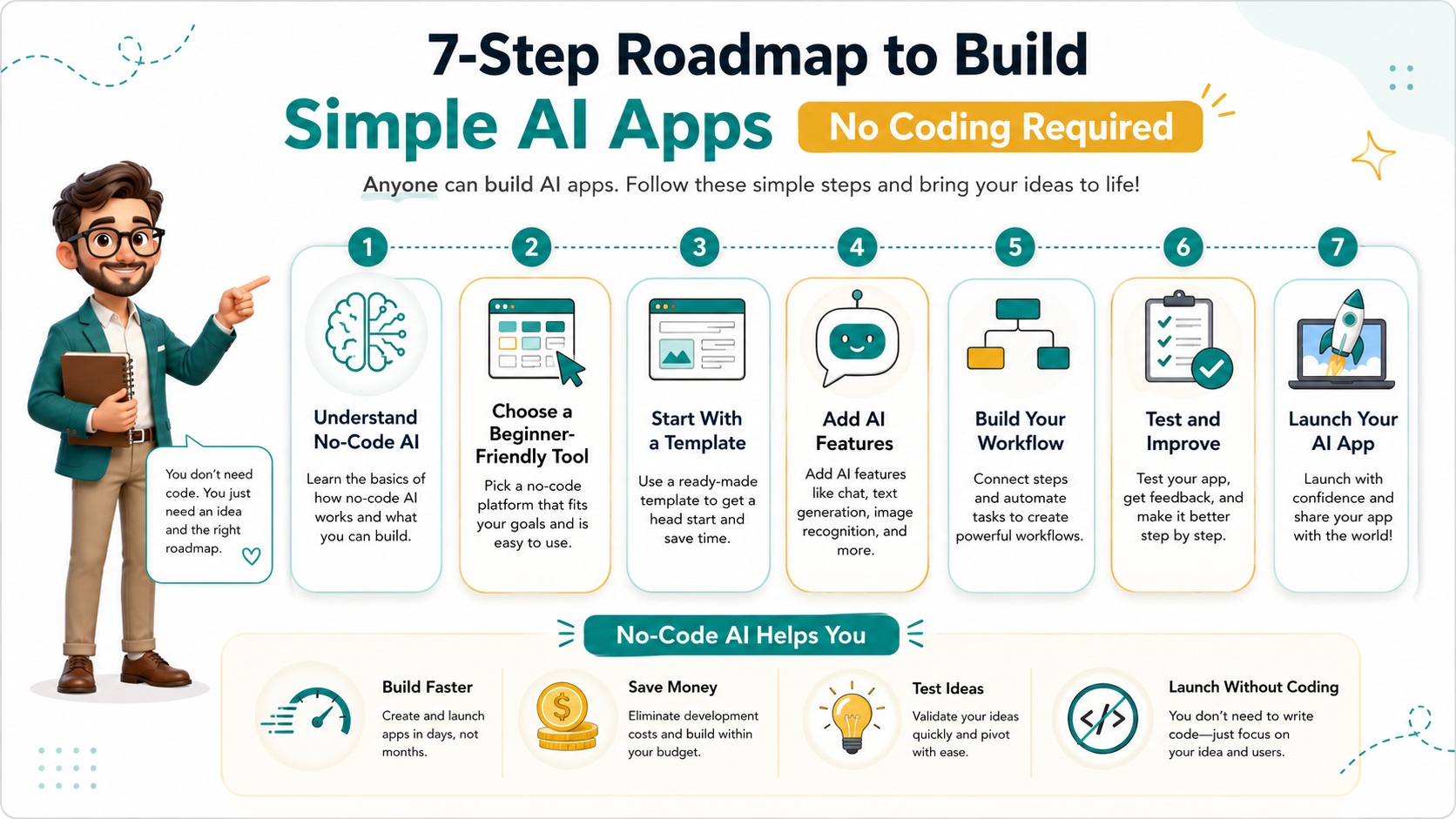
Now that you’re familiar with some tools, let’s walk through the process of building your first AI application from scratch. I’ll use a common example: creating a simple chatbot for customer support. This project is perfect for beginners because it’s practical, relatively straightforward, and demonstrates key concepts in no-code development. Follow these steps, and you’ll have a functional app in no time.
Start by defining your app’s purpose and scope. For our chatbot, decide what questions it should handle—maybe common FAQs like store hours, return policies, or product details. This clarity will guide your design and ensure you don’t get overwhelmed. Next, choose your no-code platform. For this guide, I’ll reference using a tool like Chatfuel or ManyChat, which are popular for chatbot creation, but the principles apply broadly.
Set up your account and create a new project. Most platforms will greet you with a dashboard where you can begin designing conversations. Use the visual flow builder to map out how the chatbot will respond to user inputs. For instance, if a user says “hello,” the bot might reply with a welcome message and options for help. Drag and drop elements to create these interactions; it’s like building a flowchart that brings your AI to life.
Incorporate AI features by enabling natural language processing (NLP). This allows your chatbot to understand variations in user messages rather than relying on exact keywords. For example, if a user asks, “What time do you close?” or “When is closing time?”, the AI should recognize both as queries about hours. Configure this in your platform’s settings, often through integrations with services like Dialogflow or IBM Watson, which handle the complex NLP behind the scenes.
Test your chatbot thoroughly before going live. Use the built-in testing tools to simulate conversations and identify any gaps or errors. Ask friends or colleagues to try it out and provide feedback. Iterate based on their input—maybe add more responses or refine the AI’s understanding. Once you’re satisfied, deploy your chatbot to your website or social media channels. Congratulations, you’ve just built your first AI app without writing any code!
This hands-on experience is invaluable. As you become more comfortable, you can expand your app with additional features, like connecting it to a database for personalized responses or adding multimedia elements. The key is to start small, learn continuously, and leverage the no-code tools to handle the heavy lifting for you.
Utilizing Pre-built Templates and Modules
One of the biggest advantages of no-code platforms is the availability of pre-built templates and modules. These resources can save you immense time and effort, especially when you’re new to developing AI apps without coding. Templates provide a starting point that you can customize to fit your needs, while modules offer specific functionalities that you can plug into your project. Let’s explore how to make the most of these assets.
Templates are essentially blueprints for common types of AI applications. For example, if you want to create a sentiment analysis tool that gauges customer emotions from reviews, you might find a template that includes all the necessary components: a data input form, an AI model for analysis, and a results display. By using such a template, you skip the initial setup and can focus on tailoring it to your brand or specific use case. Platforms like Appy Pie or BuildFire offer extensive template libraries categorized by industry and function.
Modules, on the other hand, are reusable pieces of functionality. Think of them as building blocks that you can combine to create more complex applications. A common module for AI apps is image recognition; you can add this to your project to enable features like identifying objects in photos or verifying user uploads. Another popular module is speech-to-text, which allows your app to transcribe audio inputs. These modules are designed to work seamlessly within the no-code environment, often requiring just a few clicks to integrate.
When selecting templates or modules, consider their compatibility with your chosen platform and your project goals. Look for options that are well-documented and supported by the community. Many platforms have marketplaces where users share their creations, so you can benefit from the collective knowledge and experience of others. This not only speeds up development but also introduces you to best practices and innovative approaches.
Customization is key to making these pre-built elements your own. Don’t be afraid to modify colors, layouts, or workflows to match your vision. The beauty of no-code tools is their flexibility; you can start with a template and evolve it into something unique. As you gain confidence, you might even create your own modules to reuse in future projects, further streamlining your workflow and enhancing your efficiency in developing AI applications.
Testing and Iterating Your AI Application
Testing is a crucial phase in developing AI apps without coding, as it ensures your application works as intended and provides a good user experience. Unlike traditional development, no-code platforms often include built-in testing tools that make this process accessible to beginners. However, it’s important to approach testing methodically to catch issues early and refine your app based on real feedback. Here’s how to do it effectively.
Begin with functional testing to verify that all features work correctly. For instance, if you’ve built a chatbot, test every possible user input you can think of to see if the AI responds appropriately. Use the platform’s simulator to run through different scenarios, checking for errors or unexpected behaviors. Pay attention to edge cases—those rare but possible inputs that might break your app. Catching these early prevents frustration for your users later on.
Next, conduct usability testing with actual people. Share your app with a small group of testers who represent your target audience. Observe how they interact with it; note where they get confused or encounter difficulties. This feedback is gold because it reveals aspects you might have overlooked. For example, testers might find that your AI’s responses are too robotic or that the navigation isn’t intuitive. Use their insights to make adjustments that enhance the overall.
Performance testing is also important, especially if your app handles large volumes of data or users. Check how it performs under load—does it slow down or crash? Many no-code platforms handle scalability automatically, but it’s wise to test limits to avoid surprises. Additionally, ensure that any integrated AI services, like external APIs, are reliable and fast. Tools like LoadView or built-in analytics can help you monitor performance metrics.
Iteration is the heart of improvement. Based on your testing results, make incremental changes to your app. Perhaps you need to tweak the AI model’s accuracy or simplify the user interface. Deploy updates and test again, repeating the cycle until you’re satisfied. Remember, developing AI applications is an ongoing process; even after launch, continue gathering user feedback and refining your app to keep it relevant and effective.
Joining the No-Code AI Community
Embarking on your journey of developing AI apps without coding can feel isolating at times, but you’re not alone. There’s a vibrant and growing community of no-code enthusiasts who share knowledge, offer support, and inspire each other. Engaging with this community can accelerate your learning, provide solutions to challenges, and open up networking opportunities. Let me share how you can get involved and benefit from these connections.
Online forums and social media groups are great places to start. Platforms like Reddit have subreddits dedicated to no-code development, where members post questions, share successes, and discuss trends. Facebook groups and LinkedIn communities are active with professionals and hobbyists alike. By participating in these spaces, you can ask for advice when stuck, learn from others’ experiences, and even find collaborators for projects.
Many no-code tool providers host their own communities. For example, Bubble’s forum is packed with tutorials, case studies, and user-generated content. These platforms often feature expert Q&A sessions, webinars, and challenges that help you deepen your skills. Attending virtual events or hackathons can also be motivating; they provide a deadline and a sense of camaraderie that pushes you to create something amazing.
Don’t underestimate the power of local meetups or online workshops. Websites like Meetup.com list no-code and AI-related events where you can connect with like-minded individuals in your area or globally. These interactions often lead to mentorship opportunities or partnerships that enhance your projects. Sharing your own journey—whether through blog posts, videos, or presentations—can also establish you as a contributor to the community and attract valuable feedback.
Being part of this ecosystem not only helps you technically but also keeps you informed about the latest tools and best practices. As no-code AI development evolves, staying connected ensures you’re always at the forefront, ready to leverage new advancements in your work. So, dive in, introduce yourself, and start building relationships that will support your growth in this exciting field.
Overcoming Common Challenges in No-Code AI Development
While developing AI apps without coding is accessible, it’s not without its challenges. Beginners often encounter obstacles that can be frustrating, but with the right mindset and strategies, you can overcome them smoothly. I’ve faced many of these myself, and I want to share practical solutions to help you navigate common pitfalls and keep your project on track.
One frequent challenge is the learning curve associated with new tools. Even though they’re designed to be user-friendly, each platform has its own interface and terminology. It’s easy to feel overwhelmed at first. The key is to start with simple projects and utilize the available resources. Most platforms offer tutorials, documentation, and customer support—take advantage of them. Break down your learning into small, manageable steps, and celebrate progress along the way.
Another issue is limitations in customization. While no-code tools are flexible, they may not support every unique feature you envision. For instance, you might want a highly specific AI algorithm that isn’t available as a module. In such cases, consider whether you can achieve your goal through creative workarounds or by combining multiple tools. Sometimes, integrating with external services via APIs can bridge the gap. If all else fails, reassess your requirements; often, a simpler solution can be just as effective.
Data privacy and security are critical concerns, especially when handling sensitive information. Ensure that the no-code platform you choose complies with regulations like GDPR or CCPA. Use built-in security features, such as encryption and access controls, to protect user data. If you’re unsure, consult the platform’s guidelines or seek advice from the community. Prioritizing security from the start builds trust and prevents costly issues.
Lastly, managing expectations is important. No-code development speeds up the process, but it still requires time and effort. Avoid the trap of assuming everything will work perfectly on the first try. Embrace iteration and view challenges as learning opportunities. With persistence and a proactive approach, you’ll find that developing AI applications without coding becomes increasingly intuitive and rewarding.
In wrapping up, developing AI apps without coding is an empowering journey that opens up innovation to everyone. By understanding the tools, following a structured process, leveraging communities, and tackling challenges head-on, you can turn your ideas into reality. Start small, stay curious, and enjoy the process of creating something uniquely yours.
Visit our GPT, Prompt & Skills Site – The AI Knowledge Vault
To see the full system:
 Read:
Read:
Systeme.io Review: All-in-One Business Platform
A Comprehensive Guide to Developing Your AI Business Model
Exploring Top AI Tools for Enhanced Business Automation
Top 7 Essential AI Business Tools
Top 6 Essential AI Automation Tools for Beginners
A Comprehensive Guide to Beginner AI Automation Tools
A Beginner’s Guide to Launching Your AI Side Hustle Today
📅 Last updated:
