
How to Develop AI-Powered Apps No-Coding Experience
Have you ever dreamed of creating an AI-powered application but felt held back by a lack of coding skills? You’re not alone. The good news is, you can develop AI-powered apps without coding experience thanks to a growing number of user-friendly tools and platforms. Whether you’re a marketer, business owner, or content creator, tapping into AI can transform your projects and workflows. In this guide, I’ll walk you through everything you need to know to build AI-powered applications from scratch, even if you’re a complete beginner at AI development. Ready to bring your app ideas to life? Let’s dive in.
Understanding AI-Powered Applications
Before jumping into building AI-powered apps, it helps to understand what these applications really are. AI-powered applications leverage artificial intelligence technologies to perform tasks that typically require human intelligence. This includes things like understanding language, recognizing images, making decisions, or predicting outcomes. For example, chatbots that answer customer questions or apps that recommend products based on your preferences are AI-powered.
One key advantage of AI-powered applications is their ability to continuously learn and improve through data. This means your app can get smarter over time, providing better user experiences or more accurate results. The applications range across industries—businesses use AI-powered apps to automate customer service, marketers rely on AI for personalized campaigns, and content creators use AI to generate or optimize content.
For beginners AI development, it’s important to grasp the basic AI components often involved in apps:
- Machine learning: Algorithms that analyze data and learn patterns.
- Natural language processing (NLP): Enables apps to understand and generate human language.
- Computer vision: Allows apps to interpret images and videos.
- Predictive analytics: Uses historical data to forecast future trends or behaviors.
Each of these components can be integrated into apps without coding through specialized tools. Understanding these concepts helps you decide which AI features make sense for your project. For instance, if you want an app that can chat with users, NLP is essential. If you’re building a photo sorting app, computer vision would be the focus.
AI is not magic, but it’s empowering. Knowing the core ideas behind AI-powered applications will give you a clearer path when you begin choosing tools and platforms to build apps without coding. Plus, this understanding lets you communicate your ideas effectively with developers or AI service providers if needed.
Choosing the Right AI Development Tools
Now that you know what AI-powered applications can do, the next step is picking the right tools to develop your app. Since you’re interested in building apps without coding, you want platforms that offer visual development or drag-and-drop interfaces combined with AI capabilities.
Many AI development tools cater to different needs and skill levels. Here are some popular options that beginners use to develop AI-powered apps:
- Microsoft Power Apps: Offers low-code solutions and integrates with Microsoft’s AI services.
- Google Cloud AutoML: Lets you train custom AI models with minimal expertise.
- IBM Watson Assistant: Provides tools to build AI chatbots and conversational apps without programming.
- Bubble: A no-code platform that supports AI integrations via plugins.
- Make (formerly Integromat): Enables automation workflows with AI services included.
When choosing a tool, consider these factors:
- Ease of use: Does it have a friendly interface for beginners?
- AI features available: Are the AI capabilities aligned with your app’s goals?
- Integration options: Can it connect with external AI APIs or data sources?
- Pricing: Does the cost fit your budget, especially if you’re testing ideas?
- Support and community: Are there tutorials, forums, or customer support?
For example, if you want to develop AI-powered applications focused on natural language chatbots, IBM Watson Assistant is beginner-friendly and robust. For image recognition features, Google Cloud AutoML offers pre-built models that you can customize without writing code.
Exploring trial versions or free tiers can help you experiment before committing. You might try building a simple app on multiple platforms to see which feels intuitive. Remember, the goal is to find tools that empower you to build apps without coding while giving you enough AI power to make your app stand out.
Exploring User-Friendly Platforms for App Building
Once you’ve picked your AI development tools, the next phase involves selecting the platform where you’ll actually build the app. User-friendly platforms designed for no-code or low-code development have revolutionized how beginners approach app creation. They offer drag-and-drop editors, pre-built components, and AI integrations all in one place.
Here are some standout platforms that help you build AI-powered apps without coding:
- Appgyver: A no-code platform with extensive integration options including AI services. Great for mobile and web apps.
- Thunkable: Focuses on mobile app development and supports AI API integrations.
- Adalo: Lets you create apps visually with AI-powered features via plugins.
- Zapier: Primarily an automation tool that can connect AI APIs to trigger app actions.
- Voiceflow: Specialized in creating conversational AI apps and voice assistants without code.
Why Platform Choice Matters
Choosing the right platform affects your app’s performance, scalability, and user experience. For beginners AI development, it’s critical to pick platforms that balance simplicity and flexibility. For instance, Voiceflow is perfect if your AI-powered app focuses on voice interaction, while Appgyver offers more general app-building capabilities.
These platforms often include templates and tutorials tailored for AI-powered applications. For example, Adalo’s marketplace offers components like chatbots or recommendation engines ready to plug into your app. This reduces development time and lowers the learning curve.
Another consideration is deployment. Many no-code platforms let you publish directly to app stores or deploy web apps seamlessly. This means you can get your AI-powered app in front of users faster, without complicated DevOps or infrastructure setup.
As an example, I once helped a small business owner build an AI-powered customer feedback app using Thunkable. They integrated sentiment analysis through an AI API and launched the app in under two weeks—all without writing a single line of code.
Remember, your platform should align with your app’s goals, your technical comfort, and your long-term plans. Don’t hesitate to explore multiple platforms before settling on one.
Implementing AI Features in Your Apps
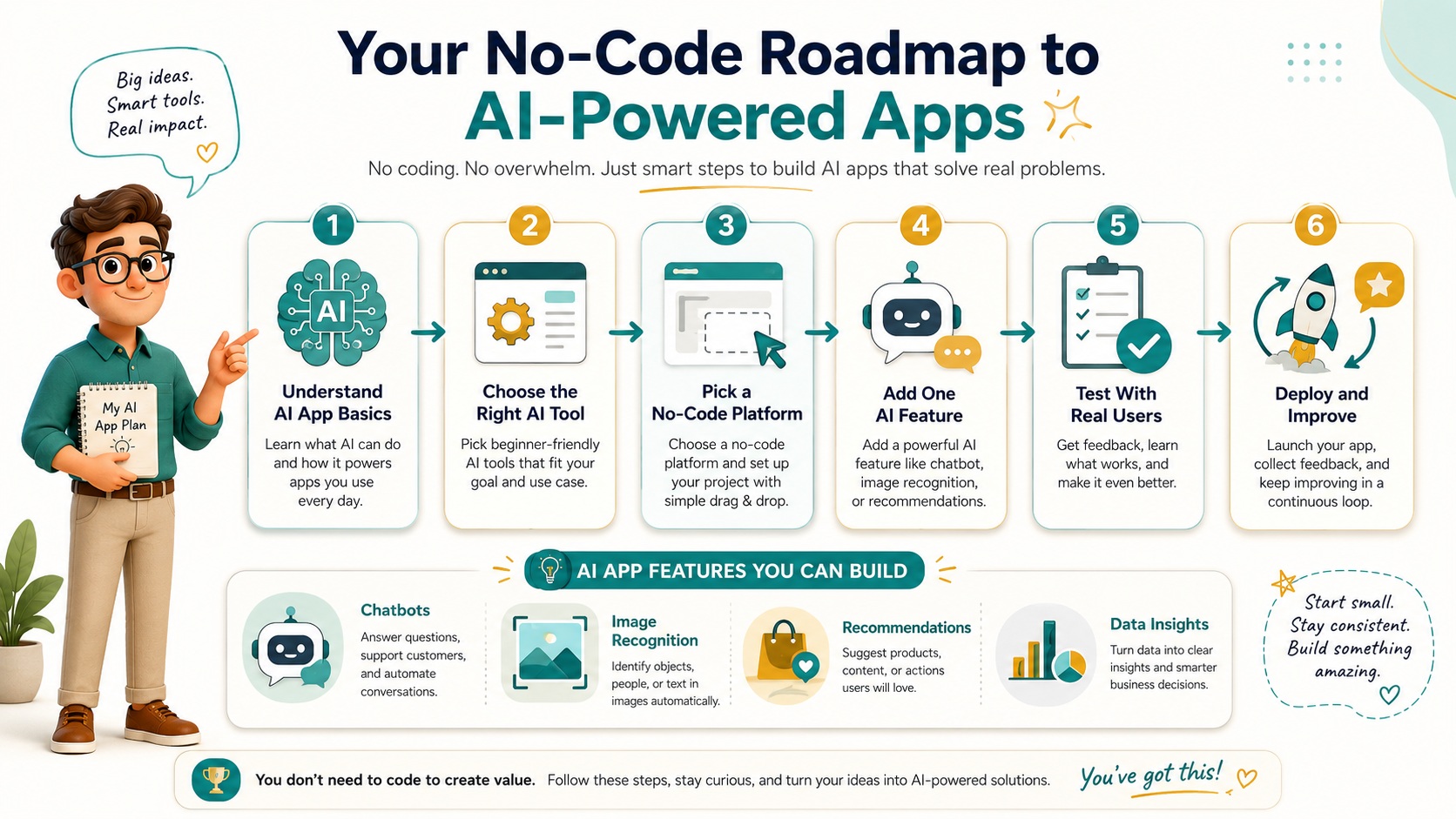
Now that you have tools and platforms, it’s time to add AI features to your app. This is where your app transforms from a basic tool into an intelligent assistant or automated system. Implementing AI without coding is possible thanks to pre-built AI models, APIs, and visual integrations offered by most platforms.
Common AI Features to Include
- Chatbots and Conversational AI: Automated agents that understand and respond to user queries.
- Image and Speech Recognition: Allow users to interact via photos, voice commands, or video.
- Recommendation Engines: Suggest products, content, or actions based on user behavior.
- Data Analysis and Predictions: Provide insights or forecasts derived from user data.
For example, adding a chatbot can be as simple as connecting your app to IBM Watson Assistant through your chosen platform’s API connector. You configure the chatbot’s intents and responses visually, then embed it inside your app interface.
Another way to implement AI features is using services like Microsoft Azure Cognitive Services. These provide ready-made machine learning models for language understanding, vision, and decision-making. Most no-code platforms support connecting to these APIs with just a few clicks.
Tips for Smooth AI Integration
- Start small: Begin with one AI feature to avoid complexity.
- Use templates: Many platforms offer AI templates to speed up implementation.
- Test iteratively: Regularly test AI responses or results with real users.
- Leverage community resources: Forums and tutorials often share integration best practices.
For instance, if you want to build an AI-powered app that recommends marketing strategies, you could integrate a predictive analytics API that analyzes user inputs and returns tailored suggestions. This can be accomplished visually without coding, using platforms like Bubble combined with AI API plugins.
By focusing on the AI features that most benefit your users, you can create impactful applications effortlessly. The key is to experiment and refine as you go.
Testing and Deploying AI-Powered Apps
Once your AI-powered app is built, testing and deployment are critical to ensure it works well for users. Testing AI applications has unique challenges compared to traditional apps because AI behavior can vary and improve over time.
Effective Testing Strategies
- Functional testing: Verify that AI features behave as expected under various scenarios.
- User testing: Collect feedback from real users interacting with the AI components.
- Performance testing: Ensure the app responds quickly and AI computations don’t cause delays.
- Bias and accuracy checks: Test AI outputs for fairness and correctness, especially in sensitive contexts.
For example, if your AI-powered app includes a chatbot, test it with diverse questions to evaluate how well it understands intents. Adjust the training data or logic based on results. Many AI platforms provide dashboards to monitor model performance and user interactions.
Deployment Best Practices
When deploying, consider your target audience and platform. Some no-code platforms allow you to publish apps directly to iOS or Android stores or host web apps with one click. Make sure you:
- Secure user data according to privacy regulations.
- Set up analytics to track user engagement and AI effectiveness.
- Plan for ongoing updates as you gather more data and feedback.
For instance, after launching an AI-powered content creation app, you could analyze which features users rely on most and improve those first. Continuous improvement helps your app stay relevant and valuable.
Finally, keep in mind that AI-powered applications often need periodic retraining or updates as new data becomes available. Choose platforms and tools that support these iterations easily without requiring coding.
If you want to learn more about deploying AI apps effectively, resources like Google’s Rules of Machine Learning offer practical advice.
Conclusion
Developing AI-powered apps without coding experience is more accessible than ever. Understanding the basics of AI-powered applications helps you identify which features suit your goals. Choosing the right AI development tools and user-friendly platforms lets you build apps visually and intuitively. Implementing AI features through pre-built models and APIs opens up countless possibilities without writing code. Finally, thorough testing and thoughtful deployment ensure your app delivers real value to users.
Whether you want to create AI chatbots, recommendation engines, or data-driven tools, beginner-friendly methods and platforms make it possible to build AI-powered applications with confidence. Start experimenting with these tools and watch your ideas come to life—no programming required.
For further reading, check out No Code Tech for the latest in no-code AI development, or explore IBM Watson Assistant to jumpstart your chatbot projects.
Visit our GPT, Prompt & Skills Site – The AI Knowledge Vault
To see the full system:
 Read:
Read:
Systeme.io Review: All-in-One Business Platform
Strategies to Conquer Common Hurdles in AI Development Without Coding
Exploring Top AI Tools for Enhanced Business Automation
Top 7 Essential AI Business Tools
Top 6 Essential AI Automation Tools for Beginners
A Comprehensive Guide to Beginner AI Automation Tools
A Guide to AI Automation Strategies for Beginners
📅 Last updated:
