
Strategies to Conquer Common Hurdles in AI Development Without Coding
Have you ever felt that building an AI app is something only tech wizards with years of coding experience can do? I used to think that too, until I discovered the world of AI development without coding. It completely changed how I approach creating smart applications for my business and clients. In this guide, I’ll walk you through practical strategies to overcome those intimidating AI development challenges, even if you’ve never written a line of code. We’ll explore user-friendly platforms, tackle common roadblocks, and turn your innovative ideas into reality. By the end, you’ll see that building AI tools is not only possible but also enjoyable and highly effective for boosting your projects.

Understanding the Landscape of No-Code AI Development
No-code AI development is revolutionizing how we build intelligent applications. It allows anyone, regardless of technical background, to create AI-powered solutions through visual interfaces and pre-built components. I remember when I first dipped my toes into this space; it felt like a whole new world had opened up. Instead of worrying about complex algorithms or programming languages, I could focus on what really matters: solving problems and delivering value. Platforms like these empower entrepreneurs, marketers, and creators to harness AI without the steep learning curve traditionally associated with it.
The growth in this sector has been explosive. According to recent industry reports, the no-code development platform market is expected to reach billions in value over the next few years. This isn’t just a trend; it’s a fundamental shift in how technology is built and deployed. For those of us in business or content creation, this means we can iterate faster, test ideas more efficiently, and stay ahead without relying on expensive developers. The key is understanding that no-code doesn’t mean no intelligence; it means the intelligence is built into the platform, ready for you to leverage.
One of the most exciting aspects is the diversity of tools available. From chatbots and image recognition systems to predictive analytics and automation workflows, the possibilities are vast. I’ve used no-code AI to build customer service bots that handle inquiries 24/7, and sentiment analysis tools that gauge audience reaction to content in real-time. Each project taught me something new about the capabilities and limitations of these platforms. It’s important to start with a clear goal and choose the right tool for that specific need, rather than getting overwhelmed by the options.
Adopting no-code AI isn’t just about convenience; it’s about accessibility. It democratizes technology, allowing small businesses and individuals to compete with larger organizations. I’ve seen solo entrepreneurs launch AI-driven apps that scale rapidly, all because they could build and tweak their products without waiting for a development team. This landscape is constantly evolving, with new features and integrations being added regularly. Staying curious and willing to experiment is crucial. Dive in, play with different platforms, and you’ll quickly see how they can transform your approach to AI app creation.
Identifying Common Challenges in AI App Creation
Even with no-code tools, building AI applications comes with its own set of hurdles. I’ve faced many of these myself, and I want to share how you can navigate them smoothly. One major challenge is data quality and preparation. AI models rely heavily on data to learn and make accurate predictions. If your data is messy, incomplete, or biased, your AI app won’t perform well. I learned this the hard way when I built a recommendation engine that kept suggesting irrelevant products. It turned out my dataset had gaps and inconsistencies that skewed the results.
Another common issue is defining the problem clearly. It’s easy to get excited about AI and jump into building without a precise goal. I’ve started projects only to realize halfway that the app wasn’t solving a real need or was too vague to be useful. This leads to wasted time and frustration. Always begin by asking: What specific problem am I trying to solve? Who is this for? How will success be measured? Answering these questions upfront saves a lot of headaches later and ensures your AI development efforts are focused and effective.
Integration with existing systems can also be tricky. You might build a fantastic AI chatbot, but if it doesn’t work well with your website or CRM, its value diminishes. I’ve spent hours figuring out how to connect a no-code AI tool with my email marketing platform, only to find that certain features weren’t compatible. Researching integration options before you start building is essential. Look for platforms that offer APIs or pre-built connectors to the tools you already use. This seamless connectivity is key to creating a cohesive tech stack.
Lastly, there’s the challenge of user adoption and trust. People can be skeptical of AI, especially if they don’t understand how it works. I built an AI-powered content assistant that my team was hesitant to use at first. They worried it would make errors or replace their creativity. Overcoming this required transparency and education. I showed them how the tool worked, its limitations, and how it could augment their skills rather than replace them. Building trust through clear communication and gradual implementation helps ensure your AI app is embraced and utilized fully.
Implementing Solutions for Seamless AI Development without coding
Now that we’ve identified common challenges, let’s dive into practical solutions. For data issues, start by curating a high-quality dataset. Use tools like data cleaning platforms to remove duplicates, fill missing values, and ensure consistency. I always spend extra time on this step because it pays off in accuracy later. Many no-code AI platforms also offer built-in data validation features; make sure to utilize them. If you’re working with limited data, consider using synthetic data generation or public datasets to supplement your own.
To tackle problem definition, adopt a structured approach. Break down your goal into smaller, manageable tasks. I use mind maps or flowcharts to visualize the AI app’s functionality and user journey. This helps identify potential gaps early on. Collaborate with stakeholders or end-users during this phase; their feedback is invaluable. I once built a scheduling assistant that missed a key feature because I didn’t consult the team that would actually use it. Involving them from the start ensures the final product meets real needs and avoids redesigns down the line.
For integration challenges, choose no-code platforms with robust connectivity options. Look for those that support webhooks, Zapier integrations, or native APIs. I prefer tools that have a wide range of pre-built connectors, as they save time and reduce complexity. Test integrations early in the development process to catch issues before they become major obstacles. If you encounter compatibility problems, sometimes using a middleware tool can bridge the gap. The goal is to create a smooth workflow where your AI app enhances rather than disrupts existing systems.
Addressing user adoption requires a mix of education and iterative improvement. Start with a pilot group and gather their feedback. Use their insights to refine the app and demonstrate its value. I often create simple tutorials or documentation that explain how to use the AI tool and what benefits it brings. Highlighting success stories or case studies within your organization can also build momentum. Remember, overcoming challenges in AI development is an ongoing process. Stay flexible, keep learning, and don’t be afraid to pivot if something isn’t working.
Leveraging User-Friendly Platforms for AI development without coding apps
Choosing the right platform is crucial for successful no-code AI development. I’ve experimented with several, and each has its strengths. For beginners, I recommend starting with something like Bubble, which offers a visual interface for building web apps with AI integrations. It’s intuitive and has a supportive community. I built my first AI-powered project management tool on Bubble, and the drag-and-drop functionality made it easy to iterate quickly. The key is to pick a platform that matches your skill level and project requirements.
For more advanced AI capabilities, platforms like Creatio provide robust tools for automation and machine learning without coding. I’ve used Creatio to develop CRM systems that predict customer behavior and automate follow-ups. Its pre-built AI components save time and ensure reliability. When evaluating platforms, consider factors like scalability, pricing, and support. You want something that can grow with your needs without breaking the bank. Many offer free tiers or trials, so take advantage of those to test drive before committing.
Integration features are another critical aspect. Look for platforms that seamlessly connect with other tools you use. For example, if you’re in marketing, you might want AI apps that integrate with your email software or social media schedulers. I always check the platform’s documentation and community forums to see how others have solved integration puzzles. Sometimes, a platform’s fewer features but better connectivity is more valuable than one with advanced AI but poor integration options. Balance is key here.
Don’t underestimate the power of community and resources. Platforms with active user communities, tutorials, and customer support can significantly smooth your development journey. I’ve learned countless tips from forum discussions and video guides. As you explore, keep a list of your favorite platforms and their pros and cons. This will help you make informed decisions for future projects. Leveraging these user-friendly tools effectively can turn complex AI development challenges into manageable, even enjoyable, tasks.
Exploring Innovative AI App Ideas Without Coding
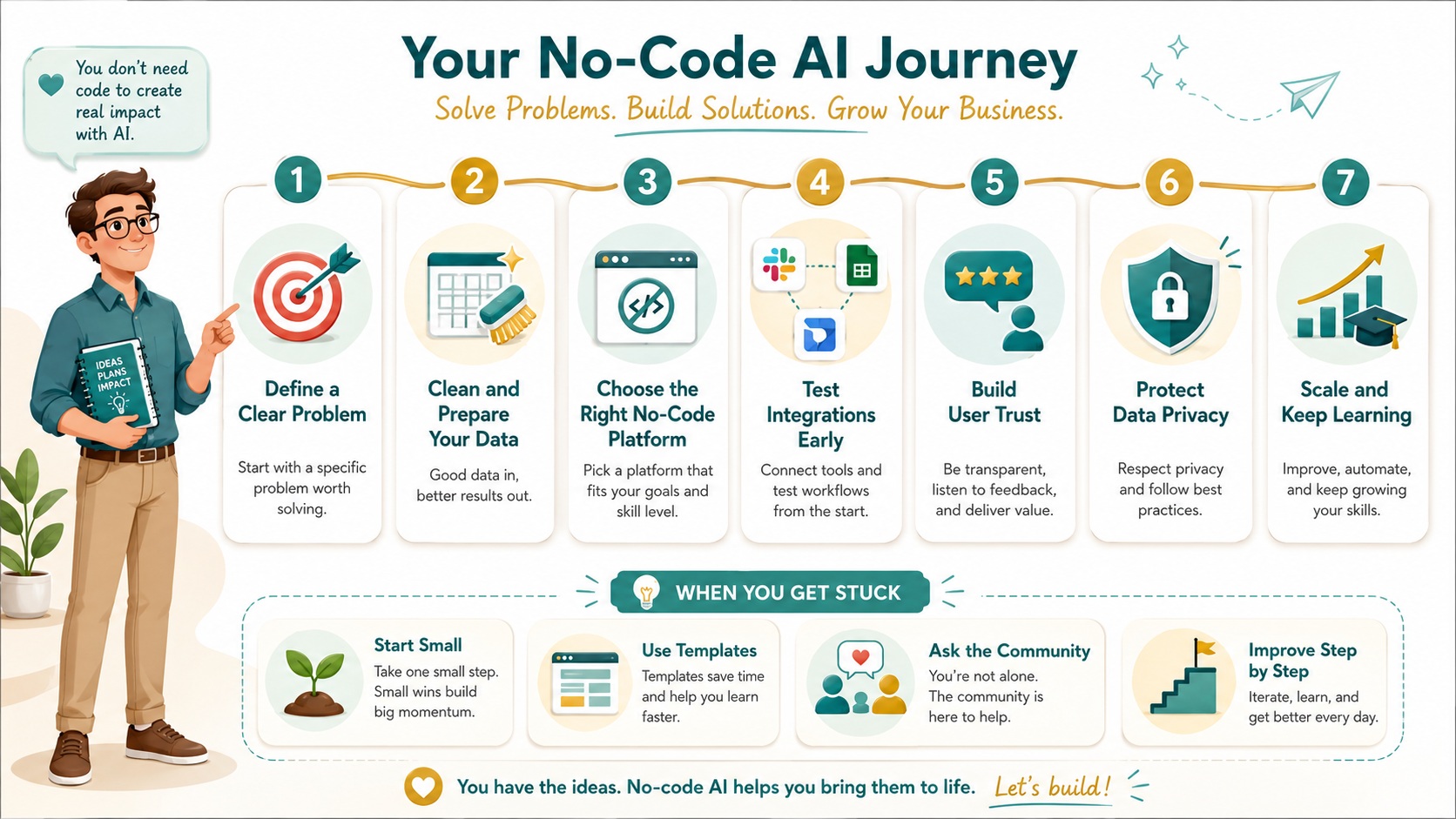
The possibilities for no-code AI apps are endless, and coming up with innovative ideas is one of the most fun parts. Start by looking at pain points in your own workflow or industry. For instance, I built a content ideation tool that uses AI to generate blog topics based on trending keywords. It saves me hours of research and keeps my content relevant. Another idea is a personalized learning assistant that adapts to user progress and recommends resources. I created one for my team’s training program, and it boosted engagement and knowledge retention.
Customer service is a ripe area for AI innovation. Consider building a chatbot that handles common inquiries, schedules appointments, or provides product recommendations. I developed a chatbot for an e-commerce site that reduced response time and increased sales. Using natural language processing capabilities in no-code platforms, you can create bots that understand context and respond appropriately. The key is to start simple and gradually add features based on user feedback and performance metrics.
For those in creative fields, AI can be a powerful collaborator. I’ve seen musicians use AI to generate melodies, and writers use it to overcome writer’s block. You could build an app that suggests design elements based on a brand’s style guide or creates social media captions that resonate with your audience. The innovation lies in combining AI’s analytical strength with human creativity. Experiment with different inputs and outputs to discover unique applications that set your projects apart.
Finally, think about sustainability and social impact. AI apps can help optimize energy usage, reduce waste, or connect volunteers with opportunities. I’m currently working on a tool that uses AI to match excess food from restaurants with local shelters. It’s rewarding to see technology used for good. Brainstorming with others can spark even more ideas; host a brainstorming session or join online communities focused on no-code AI. The goal is to think beyond traditional uses and explore how AI can solve real-world problems in new ways.
Optimizing Your AI Development without coding Process
Efficiency is key when building AI apps without coding. I’ve refined my process over multiple projects, and it starts with planning. Before opening any platform, I outline the app’s objectives, features, and user flow. This blueprint guides development and prevents scope creep. I use tools like Trello or Notion to track tasks and deadlines. Breaking the project into phases—design, build, test, launch—helps maintain momentum and ensures nothing is overlooked. A well-organized approach reduces stress and leads to better outcomes.
Testing is another critical component. I always conduct thorough tests at each stage of development. For AI apps, this means checking not only functionality but also accuracy and performance. I create test cases that simulate real-world scenarios and use A/B testing to compare different AI models or parameters. Involving beta testers early provides valuable external perspectives. I’ve caught many issues this way that I might have missed on my own. Remember, the goal is to deliver a reliable and user-friendly product, so don’t rush the testing phase.
Documentation might seem tedious, but it’s a lifesaver. I maintain a simple document that explains how the app works, how to use it, and troubleshooting steps. This is especially helpful if others will be using or maintaining the app. Clear documentation also makes it easier to onboard new team members or scale the project later. I often include screenshots or video walkthroughs to make it more accessible. Taking the time upfront saves countless hours down the road and ensures consistency.
Finally, embrace iteration. Your first version doesn’t have to be perfect. Launch with a minimum viable product (MVP) and gather user feedback. Use analytics to monitor how the app is performing and identify areas for improvement. I regularly review metrics like user engagement, error rates, and satisfaction scores. This data-driven approach allows me to make informed updates and enhancements. Continuous improvement is what turns a good AI app into a great one. Stay open to learning and adapting as you go.
Ensuring Data Privacy and Security in No-Code AI
Data privacy is a top concern in AI development, and it’s something I take very seriously. When building no-code AI apps, you’re handling sensitive information, so implementing robust security measures is non-negotiable. Start by choosing platforms that comply with regulations like GDPR or CCPA. I always review their privacy policies and data handling practices before committing. Look for features like encryption, access controls, and regular security updates. Protecting user data builds trust and avoids legal complications.
Be mindful of the data you collect and store. Only gather what’s necessary for your app to function. I apply the principle of data minimization, which means collecting the least amount of data needed. For example, if your AI app doesn’t require personal details, don’t ask for them. Anonymize or pseudonymize data wherever possible to reduce risks. I’ve used tools that automatically strip identifying information from datasets before processing. This extra step adds a layer of protection without sacrificing functionality.
Educate yourself and your users about data usage. Clearly communicate how data will be used, stored, and shared. I include a privacy notice within the app and provide options for users to control their data. Transparency fosters trust and compliance. Additionally, regularly audit your data practices. I set reminders to review security settings and access logs periodically. If you’re working with a team, ensure everyone understands their role in maintaining data integrity. A proactive approach prevents breaches and reinforces your app’s reliability.
Lastly, have a response plan for potential incidents. Despite best efforts, issues can arise. I have a simple protocol that outlines steps to take if data is compromised, including notifying affected users and authorities if required. Preparing for the worst-case scenario ensures you can act quickly and minimize damage. By prioritizing data privacy and security from the development stage, you create a foundation of trust that enhances your app’s value and longevity.
Scaling Your No-Code AI Applications Effectively
Scaling is where many no-code AI projects hit a wall, but with the right strategies, you can grow smoothly. I’ve scaled several apps from prototypes to handling thousands of users, and it starts with architecture. Choose platforms that offer scalability features like auto-scaling or load balancing. For instance, some no-code tools automatically adjust resources based on traffic, preventing crashes during peak times. I always stress-test my apps simulate high usage to identify bottlenecks early. This proactive approach ensures performance remains stable as demand increases.
Database management is another crucial factor. As your app grows, so does the data it handles. Opt for databases that can scale horizontally or vertically without downtime. I prefer cloud-based solutions because they offer flexibility and reliability. Regularly optimize your queries and indexes to maintain speed. I schedule routine maintenance to clean up old data and archive unnecessary records. Efficient data handling keeps your app responsive and reduces costs associated with storage and processing.
Monetization and user acquisition strategies should evolve with scale. If your AI app is free initially, consider introducing premium features or subscription plans as it gains popularity. I’ve used freemium models successfully, where basic functions are free, but advanced capabilities require payment. This generates revenue while expanding your user base. Marketing efforts should also scale; leverage analytics to identify your most effective channels and double down on them. Word-of-mouth and user referrals can be powerful drivers of growth.
Finally, don’t neglect support and community building. As user numbers grow, so do questions and feedback. Implement scalable support systems like knowledge bases, chatbots, or ticketing systems. I’ve found that actively engaging with users on forums or social media fosters loyalty and provides insights for improvement. Scaling is not just about technical capacity; it’s about maintaining quality and connection with your audience. Plan for growth from the beginning, and your no-code AI app will thrive at any size.
Staying Updated with No-Code AI Trends and Tools
The no-code AI landscape is dynamic, with new tools and trends emerging regularly. Staying updated is essential to maintain a competitive edge. I make it a habit to follow industry blogs, podcasts, and newsletters. Resources like NoCode Tech provide valuable insights and reviews of the latest platforms. Attending webinars or virtual conferences also keeps me informed about innovations. I often discover features or techniques that streamline my development process or open up possibilities I hadn’t considered.
Experimenting with new tools is another way to stay current. I allocate time each month to test a new no-code AI platform or feature. Even if I don’t immediately use it, understanding what’s available helps me make better decisions for future projects. Many platforms offer sandbox environments or free trials, making experimentation risk-free. I’ve stumbled upon game-changing integrations or functionalities this way that significantly improved my apps. Keeping an open mind and being curious drives continuous improvement.
Networking with other no-code enthusiasts is incredibly valuable. Join online communities, forums, or social media groups where people share experiences and tips. I’ve learned shortcuts, solved problems, and even found collaboration opportunities through these networks. Sharing your own journey can also help others and establish you as a knowledgeable resource. The collective intelligence of a community accelerates learning and innovation far beyond what you can achieve alone.
Lastly, reflect on your own experiences and adapt. After each project, I review what worked well and what could be improved. This reflection helps me refine my approach and stay aligned with best practices. The goal is to build a mindset of lifelong learning. No-code AI development is evolving rapidly, and those who adapt quickly will lead the way. By staying engaged with trends and tools, you ensure your skills and projects remain relevant and effective.
Conclusion
Overcoming AI development challenges without coding is entirely achievable with the right strategies and tools. From understanding the no-code landscape to scaling your applications, each step offers opportunities to learn and grow. I’ve shared practical insights from my own journey, hoping they empower you to tackle your projects with confidence. Remember, the key is to start small, iterate based on feedback, and stay curious about new possibilities. No-code AI democratizes technology, allowing anyone to bring innovative ideas to life. Embrace the process, and you’ll find that building AI apps is not only feasible but also incredibly rewarding.
Visit our GPT, Prompt & Skills Site – The AI Knowledge Vault
To see the full system:
 Read:
Read:
Systeme.io Review: All-in-One Business Platform
A Comprehensive Guide to Developing Your AI Business Model
Exploring Top AI Tools for Enhanced Business Automation
Top 7 Essential AI Business Tools
Top 6 Essential AI Automation Tools for Beginners
A Comprehensive Guide to Beginner AI Automation Tools
A Beginner’s Guide to Launching Your AI Side Hustle Today
📅 Last updated:
