
A Beginners Guide to Developing AI Apps Without Coding Knowledge
Have you ever had a brilliant idea for an AI app but felt held back because you don’t know how to code? I’ve been there, and I know how frustrating it can be. The good news is, you no longer need to be a programming expert to bring your AI visions to life. With the rise of no-code platforms, anyone with a creative mind can develop AI apps without coding. In this guide, I’ll walk you through everything you need to get started, from understanding the basics to deploying your very first application. Whether you’re a business owner, marketer, or just someone curious about AI, this friendly, step-by-step approach will empower you to create something amazing. Let’s dive in and explore how you can turn your ideas into reality, no technical skills required.

Understanding the Basics of AI Apps without coding Development
Before we jump into building, it’s essential to grasp what AI app development entails. At its core, AI, or artificial intelligence, involves creating systems that can perform tasks typically requiring human intelligence. These tasks include recognizing patterns, making predictions, and learning from data. Traditionally, developing AI applications required deep knowledge in programming languages like Python and frameworks such as TensorFlow. However, the landscape has dramatically shifted. Now, you can develop AI apps without coding by leveraging user-friendly platforms that handle the complex backend for you.
No-code AI development platforms use visual interfaces, drag-and-drop tools, and pre-built templates to simplify the process. Instead of writing lines of code, you focus on designing the logic and functionality of your app. For example, you might use a platform that lets you upload data, train a machine learning model through a few clicks, and then integrate it into an application. This approach democratizes AI, making it accessible to beginners and non-technical users. It’s like having a powerful engine under the hood that you can control with a simple dashboard.
One key concept in AI app development is machine learning, a subset of AI where systems learn from data. In no-code environments, this often involves using pre-trained models or training your own with provided datasets. You don’t need to understand the algorithms deeply; the platform optimizes them for you. Another important aspect is data—AI apps rely on quality data to function accurately. No-code tools usually guide you through data preparation, ensuring your inputs are clean and relevant. This foundational knowledge sets the stage for exploring specific platforms and methods to bring your ideas to life efficiently.
Exploring No-Code Platforms for AI Apps without coding Creation
When it comes to creating AI applications without coding, several platforms stand out for their ease of use and powerful features. These tools are designed with beginners in mind, offering intuitive interfaces that make AI accessible. Let’s explore some of the top options available today, each catering to different needs and skill levels.
Popular No-Code AI Tools
One of the most well-known platforms is IBM Watson, which provides a range of AI services through a no-code interface. With Watson, you can build chatbots, analyze data, and even create visual recognition apps without writing a single line of code. It’s great for businesses looking to integrate AI into customer service or marketing. Another excellent tool is Google’s AutoML, which allows you to train custom machine learning models using your data. It’s user-friendly and offers high accuracy, making it ideal for projects involving image or text classification.
For those interested in natural language processing, OpenAI’s API can be accessed through no-code platforms like Zapier or Bubble, enabling you to incorporate advanced AI into apps effortlessly. Additionally, tools like Adalo and Glide are perfect for building mobile apps with AI features, such as personalized recommendations or automated responses. These platforms often include templates and tutorials to help you get started quickly. By choosing the right tool based on your project’s requirements, you can streamline the development process and focus on creativity rather than technical hurdles.
Choosing the Right Platform for Your Needs
Selecting a no-code AI platform depends on factors like your project goals, budget, and desired features. If you’re building a simple chatbot, a tool like Chatfuel or ManyChat might suffice. For more complex applications involving data analysis, platforms like Microsoft Power Apps with AI Builder offer robust capabilities. It’s important to consider scalability too—some tools are better suited for small projects, while others can handle enterprise-level applications. Most platforms offer free tiers or trials, so I recommend experimenting with a few to see which one feels most intuitive for you. Reading reviews and checking community support can also guide your decision, ensuring you pick a platform that aligns with your vision.
Step-by-Step Guide to Building Your First AI App Without Coding
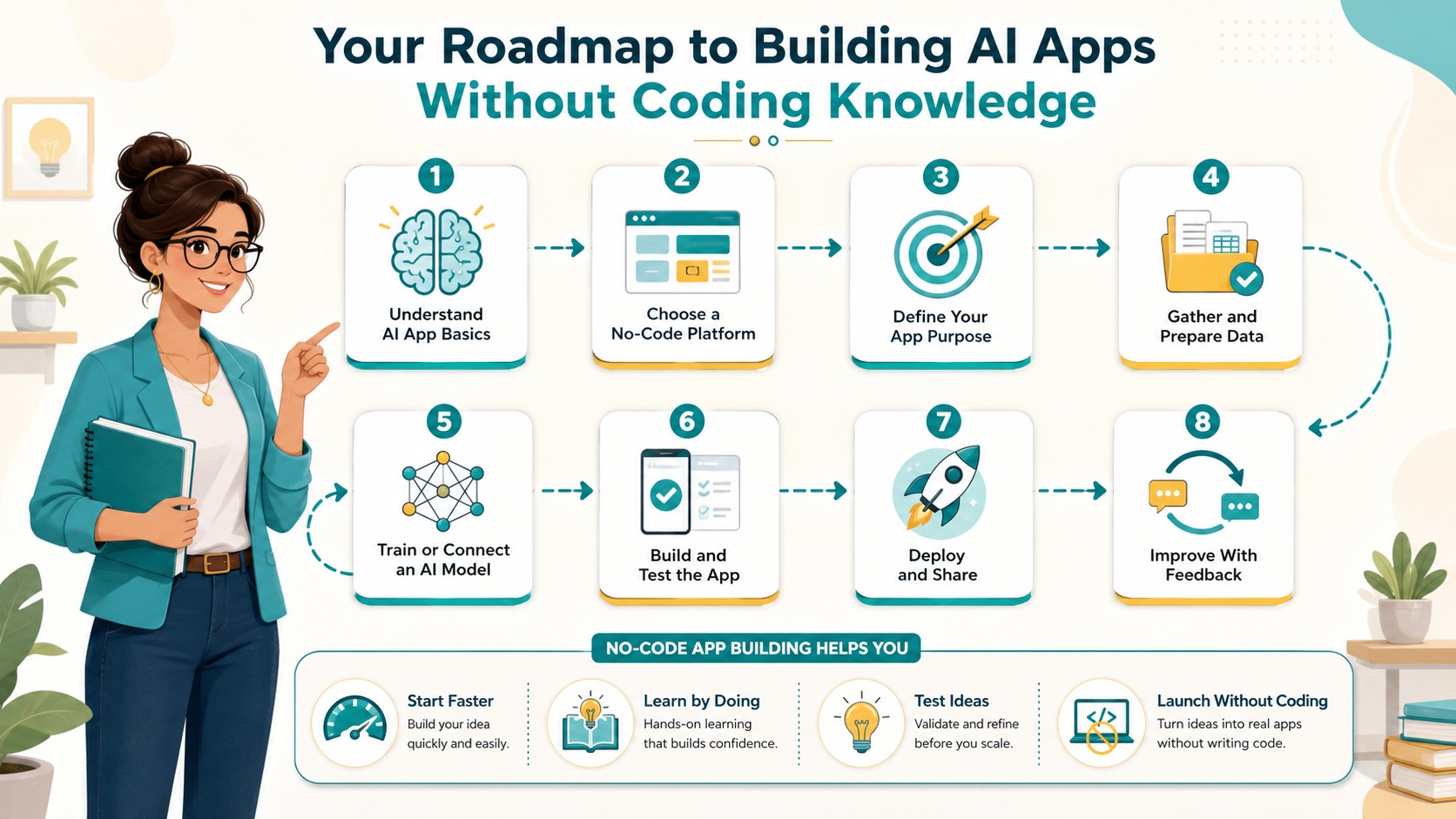
Now that you’re familiar with the basics and some platform options, let’s walk through creating your first AI app from scratch. This step-by-step guide will use a general approach that you can adapt to most no-code tools. For this example, imagine we’re building a simple image recognition app that identifies objects in photos.
Step 1: Define Your App’s Purpose and Gather Data
Start by clearly outlining what you want your AI app to do. In this case, our goal is to recognize common objects like cats, dogs, or cars in images. Next, gather a dataset of images related to your categories. You can use free resources like Kaggle Datasets to find pre-labeled images or create your own by collecting photos. Ensure your data is diverse and representative to improve the AI’s accuracy. Most no-code platforms have built-in tools to help you upload and organize this data, making the process straightforward even for beginners.
Step 2: Choose a No-Code Platform and Set Up Your Project
Select a platform that supports image recognition, such as Google AutoML Vision or a similar service. Sign up for an account and create a new project. Typically, you’ll be guided through a setup wizard where you name your project and specify the type of AI model you’re building. For image recognition, you might choose a classification model. The platform will then prompt you to upload your dataset. This step is crucial—take your time to ensure all images are properly labeled according to the categories you defined earlier. The platform will handle splitting the data into training and validation sets, which helps in testing the model’s performance.
Step 3: Train Your AI Model
With your data uploaded, initiate the training process. This is where the platform uses your dataset to teach the AI model how to recognize patterns. Depending on the size of your data and the platform, training might take from a few minutes to several hours. You don’t need to adjust technical parameters; the no-code tool optimizes everything automatically. Once training is complete, the platform will provide metrics like accuracy and precision, giving you insights into how well your model performs. If the results aren’t satisfactory, you can improve them by adding more data or refining your labels, then retrain the model.
Step 4: Build and Test Your Application
After training, it’s time to integrate your AI model into an application. Many platforms offer built-in app builders or export options. For instance, you might use a tool like Bubble to create a web app where users can upload images and see predictions. Drag and drop elements to design a simple interface, such as an upload button and a results display. Connect your trained model to the app using the platform’s integration features. Test thoroughly by uploading various images to ensure the AI responds correctly. This iterative testing helps catch any issues before deployment, ensuring a smooth user experience.
Step 5: Deploy and Share Your App
Once you’re happy with the app, deploy it to a live environment. Most no-code platforms provide hosting options or guides for publishing to app stores or web servers. Share your creation with others to gather feedback and make improvements. Remember, deployment isn’t the end—continuously monitor performance and update your model with new data to keep it accurate over time. This hands-on approach not only brings your idea to life but also builds your confidence in using no-code tools for future projects.
Common Challenges in Developing AI apps without coding Applications
While no-code AI development is accessible, it’s not without its challenges. Understanding these potential pitfalls can help you navigate them more effectively. One common issue is data quality. Since AI models rely heavily on data, incomplete or biased datasets can lead to inaccurate results. For example, if your image recognition app is trained mostly on photos of dogs in daylight, it might struggle with nighttime images. To mitigate this, ensure your data is diverse and representative of real-world scenarios. Most platforms offer data validation tools, but it’s up to you to curate thoughtfully.
Another challenge is the limitation of customization. No-code platforms provide pre-built components, which might not cover every unique need. If you require highly specific functionality, you might find the options restrictive. However, many tools are expanding their capabilities, and often, you can use integrations with other services to fill gaps. Performance can also be a concern, especially with complex models. Training might be slower or less optimized compared to custom-coded solutions, but for most beginner projects, the trade-off in ease of use is worth it. Being aware of these challenges allows you to plan ahead and choose platforms that best address your requirements.
Lastly, cost can be a factor. While many no-code tools have free tiers, advanced features or high usage may incur fees. It’s important to budget accordingly and explore pricing plans before committing. Despite these hurdles, the benefits of rapidly prototyping and deploying AI apps without coding knowledge far outweigh the drawbacks, especially for those just starting out.
Tips for Successful Deployment of AI Apps Without Coding
Deploying your AI app successfully involves more than just clicking a publish button. Here are some tips to ensure a smooth launch and ongoing success. First, focus on user experience. Even the most advanced AI won’t be effective if the app is hard to use. Design an intuitive interface with clear instructions and feedback mechanisms. Test with real people to identify any usability issues before going live. This human-centered approach increases adoption and satisfaction.
Second, monitor performance post-deployment. Use analytics tools provided by your platform to track how your app is being used and how the AI is performing. Look for patterns in errors or inaccuracies and be prepared to retrain your model with new data. Continuous improvement is key to maintaining relevance. Additionally, consider scalability. If your app gains popularity, ensure your chosen platform can handle increased traffic without compromising speed or functionality. Some tools offer auto-scaling features, but it’s wise to check this in advance.
Finally, engage with your audience. Gather feedback through surveys or reviews to understand what users like and what can be improved. This not only helps refine your app but also builds a loyal user base. Remember, deployment is just the beginning—iterating based on real-world use will make your AI application more robust and valuable over time.
Expanding Your Skills with No-Code AI Development
As you become more comfortable with no-code AI tools, you might want to expand your skills and tackle more complex projects. Many platforms offer advanced features that allow for deeper customization and integration. For example, you can start incorporating APIs from services like AWS Machine Learning to add powerful capabilities without coding. Exploring these options can help you build more sophisticated applications, such as those involving real-time data processing or multi-modal AI combining text, image, and voice inputs.
Joining communities and forums related to no-code development can also accelerate your learning. Platforms like Reddit or dedicated user groups often share tips, tutorials, and success stories. Participating in these communities not only provides support but also inspires new ideas. Additionally, consider taking online courses or attending webinars offered by no-code tool providers. These resources can deepen your understanding and keep you updated on the latest trends and features. By continuously learning and experimenting, you’ll unlock even more potential in your AI app development journey.
Real-World Examples of AI apps without coding Applications
To illustrate the power of no-code AI, let’s look at some real-world examples. Many companies and individuals have successfully built impactful applications without writing code. For instance, a small e-commerce business might use a no-code platform to develop a recommendation engine that suggests products based on user behavior. This not only enhances the shopping experience but also boosts sales through personalization.
Another example is in healthcare, where clinics use no-code tools to create apps that help patients schedule appointments or get preliminary diagnoses based on symptoms. These applications improve efficiency and accessibility. Even in education, teachers have built AI-powered apps to personalize learning materials for students. These success stories demonstrate that with creativity and the right tools, you can develop AI apps without coding that solve real problems and add value across various industries.
Future Trends in AI apps without coding Development
The field of no-code AI is rapidly evolving, with new trends shaping its future. One significant trend is the integration of AI with other technologies like IoT (Internet of Things) and blockchain. This allows for even more innovative applications, such as smart home systems that learn user preferences or secure, decentralized AI solutions. Additionally, platforms are becoming more intuitive, with AI-assisted design tools that suggest improvements or automate parts of the development process.
Another trend is the rise of ethical AI considerations within no-code tools. As AI becomes more prevalent, issues like bias and privacy are gaining attention. Future platforms may include built-in features to audit models for fairness and transparency, making it easier for beginners to develop responsible AI. Keeping an eye on these trends can help you stay ahead of the curve and leverage the latest advancements in your projects.
Resources and Next Steps for Your Journey
To continue your journey in no-code AI development, here are some valuable resources. First, explore the documentation and tutorials provided by your chosen platforms—they often contain step-by-step guides and best practices. Websites like NoCode Tech offer reviews and comparisons of different tools, helping you make informed decisions. Additionally, books and online courses on AI fundamentals can deepen your understanding, even if you’re not coding.
As next steps, challenge yourself with a project that pushes your boundaries. Maybe build an app that combines multiple AI features or solves a problem in your community. Share your work with others to get feedback and inspire fellow beginners. Remember, the goal is not perfection but progress. Each project you complete builds your skills and confidence, bringing you closer to mastering the art of developing AI apps without coding.
Conclusion
Developing AI apps without coding is an exciting and accessible way to bring innovative ideas to life. From understanding the basics to deploying your first application, this guide has covered the essential steps and considerations. By leveraging no-code platforms, you can overcome technical barriers and focus on creativity and problem-solving. Remember to start small, iterate based on feedback, and continuously learn from resources and communities. Whether for business, personal use, or social impact, the power to create AI applications is now in your hands. Embrace this opportunity, and start building something amazing today.
Visit our GPT, Prompt & Skills Site – The AI Knowledge Vault
To see the full system:
 Read:
Read:
Systeme.io Review: All-in-One Business Platform
A Comprehensive Guide to Developing Your AI Business Model
Exploring Top AI Tools for Enhanced Business Automation
Top 7 Essential AI Business Tools
Top 6 Essential AI Automation Tools for Beginners
A Comprehensive Guide to Beginner AI Automation Tools
A Beginner’s Guide to Launching Your AI Side Hustle Today
📅 Last updated:
