
Best AI App Ideas Without Coding Experience
Have you ever dreamed of creating your own AI app but felt held back because you can’t code? I’ve been there too, and I’m here to tell you it’s completely possible to bring your ideas to life without writing a single line of code. The rise of no-code platforms has opened up a world of opportunities for beginners, retirees, and anyone eager to innovate with artificial intelligence. In this guide, I’ll walk you through some of the best AI app ideas without coding that you can develop easily, along with the tools and resources to get started. Whether you’re looking to start a new hobby, launch a side business, or simply explore the exciting field of AI, this article is your friendly roadmap to success.
Introduction to No-Code AI App Development
No-code AI app development is a method that allows you to build functional applications using visual interfaces and pre-built components instead of traditional programming. I find it incredibly empowering because it removes the technical barriers that often discourage non-technical people from entering the tech space. Platforms like Bubble and Adalo provide drag-and-drop editors where you can design your app’s layout, integrate AI capabilities through plugins, and deploy it to the web or mobile stores. The core idea is that you focus on your concept and user experience while the platform handles the complex coding in the background.
This approach is not just a simplified version of development. it’s a fundamental shift in how we create value with technology. For instance, you can use AI services like image recognition, natural language processing, or predictive analytics by simply connecting to APIs through a visual workflow. I’ve seen retirees with no prior tech experience build apps that help their communities, and beginners launch startups that attract real users. The key is starting with a clear idea and leveraging the right no-code tools to execute it efficiently.
Another aspect I love about no-code AI is its accessibility. You don’t need a computer science degree or years of training. Many platforms offer tutorials, templates, and communities where you can learn as you go. This democratization of technology means that more people can contribute innovative solutions to real-world problems. Whether you want to create an app for personal use or for a broader audience, no-code development makes it feasible and fun.
Benefits of Creating AI Apps Without Coding
One of the biggest benefits I’ve experienced is the significant reduction in time and cost. Traditional app development can take months and require a large budget for developers. With no-code tools, you can prototype an AI app in days or even hours, and many platforms offer free tiers to get started. This allows you to test your ideas quickly and iterate based on feedback without financial risk. For retirees on a fixed income or beginners exploring new ventures, this affordability is a game-changer.
Another advantage is the flexibility and creativity it unleashes. Since you’re not bogged down by technical constraints, you can focus on designing an app that truly meets user needs. I’ve built apps for niche markets that big companies overlook, such as personalized meditation guides or local event planners, all powered by AI. The ability to code means you can experiment freely and pivot your idea without starting from scratch. This encourages innovation and helps you stay responsive to market trends.
No-code development also fosters lifelong learning and personal growth. As you build your AI app, you’ll gain valuable skills in design, logic, and problem-solving. Many platforms provide analytics and insights that help you understand user behavior and improve your app over time. For retirees, this can be a rewarding way to stay mentally active and engaged. For beginners, it’s a stepping stone to more advanced tech pursuits. The sense of accomplishment from creating something functional and useful is incredibly motivating.
Top 5 AI App Ideas for Beginners and Retirees
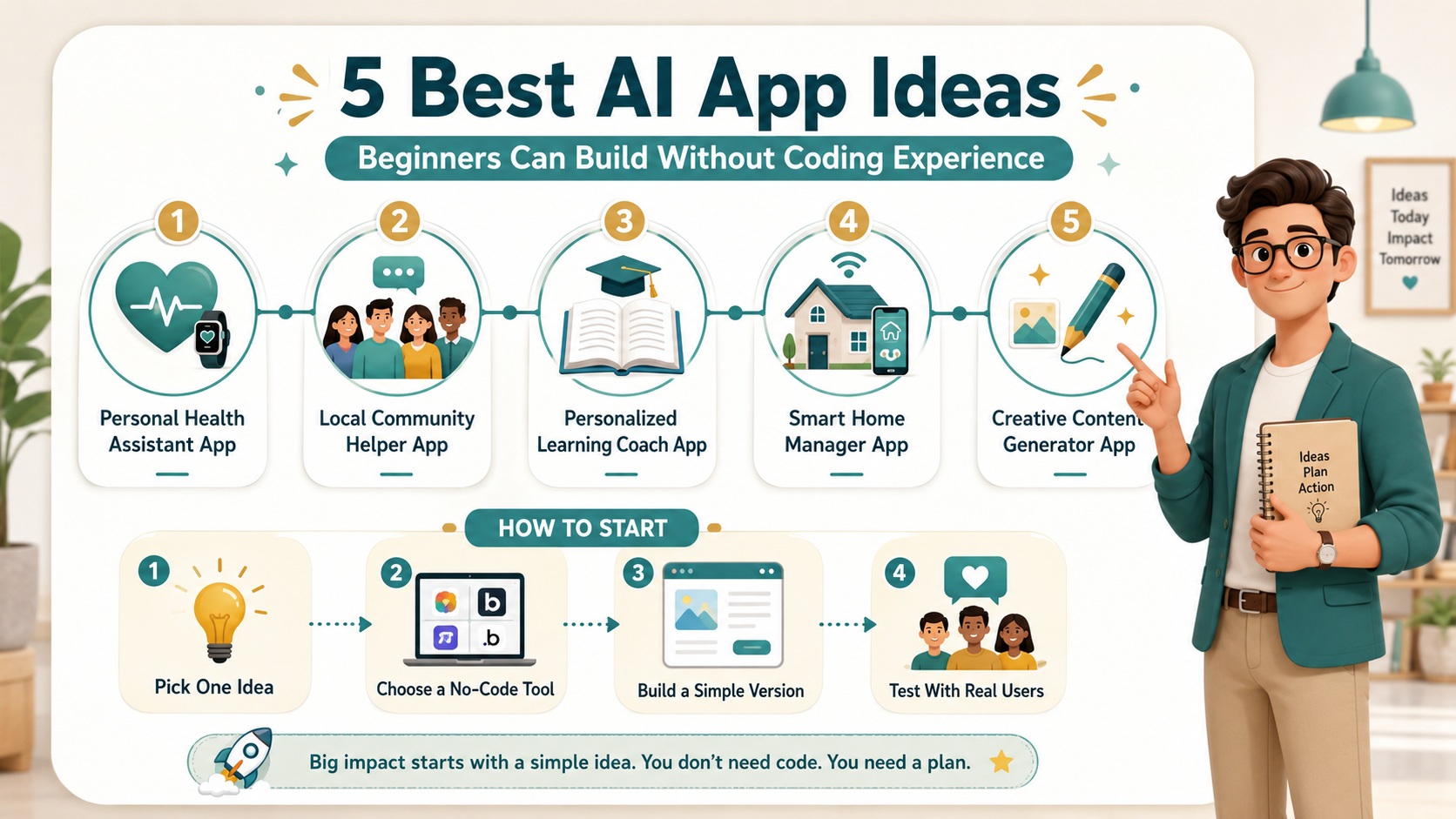
If you’re looking for inspiration, here are five AI app ideas that are perfect for those without coding experience. Each idea leverages AI in a practical way and can be built using no-code platforms.
Personal Health Assistant App
A personal health assistant app can help users track their wellness goals, provide reminders for medications, and offer personalized advice based on their data. Using AI, you can integrate features like sentiment analysis to check mood or image recognition for food logging. I recommend starting with a simple version that focuses on one aspect, such as daily step tracking with motivational messages. Platforms like Glide make it easy to connect to health APIs and create a beautiful interface.
Local Community Helper App
This app connects neighbors to share resources, organize events, or offer support. AI can enhance it by matching people based on interests or needs, using natural language processing to facilitate communication. For retirees, this is a great way to foster community engagement and address local issues. You can build it with tools that allow for user profiles, chat features, and recommendation engines without any coding.
Personalized Learning Coach App
An AI-powered learning coach app tailors educational content to the user’s pace and preferences. It can suggest courses, quiz users adaptively, and provide feedback. This idea is ideal for beginners who want to share knowledge or retirees looking to teach others. No-code platforms with AI integrations enable you to create interactive experiences that feel personalized and engaging.
Smart Home Manager App
With the growth of IoT devices, a smart home manager app that uses AI to optimize energy usage, security, and comfort is highly valuable. You can design it to learn user habits and automate routines, such as adjusting thermostats or turning off lights. This project is practical and can be built using no-code tools that connect to popular smart home APIs.
Creative Content Generator App
This app helps users create art, music, or writing prompts using AI algorithms. For example, it could generate poetry based on user input or suggest color palettes for designs. It’s a fun project that taps into creativity and can be monetized through subscriptions. No-code platforms support integrations with AI services like OpenAI for text generation or Runway ML for visual content.
Comparison of User-Friendly AI App Platforms
When choosing a platform for your AI app, it’s important to compare options based on ease of use, features, and cost. I’ve tested several popular no-code tools and here’s my analysis to help you decide.
Bubble is a powerful platform that offers extensive customization and robust AI integrations through plugins. It’s ideal if you want to build complex applications with databases and user authentication. However, there’s a learning curve, and pricing can add up for advanced features. For beginners, I suggest starting with their free plan to explore basics.
Adalo is another excellent choice, especially for mobile apps. Its drag-and-drop interface is intuitive, and it includes built-in AI components for things like chat bots or image recognition. The pricing is reasonable, with a free tier that allows basic app creation. I find it perfect for retirees who prefer a straightforward design process.
Glide stands out for turning spreadsheets into apps quickly. If your AI app relies on data management, Glide’s integration with Google Sheets and AI add-ons can streamline development. It’s very user-friendly and affordable, making it great for simple projects. However, it may lack the flexibility for highly customized AI features.
Overall, each platform has strengths depending on your project needs. I recommend trying a few with free plans to see which one feels most comfortable for your AI app ideas without coding.
Features to Look for in No-Code AI Development Tools
Selecting the right tool is crucial for success. Here are key features I always look for when evaluating no-code AI development platforms.
First, ease of use is paramount. The interface should be visual and intuitive, with clear tutorials and support. Tools that offer templates or pre-built components can save you time and reduce frustration. For example, platforms with drag-and-drop editors allow you to focus on design rather than technical details.
AI integration capabilities are another critical feature. Look for tools that provide built-in AI services or easy connections to external APIs. This might include natural language processing, machine learning models, or data analysis tools. The best platforms make these integrations seamless, so you can add smart features without coding knowledge.
Scalability and performance should also be considered. As your app grows, you’ll want a platform that can handle increased users and data. Check if the tool offers reliable hosting, security features, and options for upgrading plans. This ensures your AI app remains functional and efficient over time.
Lastly, community and resources are invaluable. Platforms with active user forums, documentation, and customer support can help you overcome challenges quickly. I’ve found that being part of a community accelerates learning and provides inspiration for improving your app.
Exploring Free Resources for Building AI Apps
You don’t need to spend money to start building AI apps. There are many free resources available that I’ve used to enhance my projects.
Online tutorials and courses are a great starting point. Websites like YouTube offer countless videos on no-code development and AI integrations. I often search for specific platform guides to learn new techniques. These resources provide step-by-step instructions that make complex concepts accessible.
Free AI APIs and tools can be integrated into your app at no cost. Services like Google’s Natural Language API or IBM Watson offer free tiers for limited use, which is perfect for testing and small-scale applications. By leveraging these, you can add advanced AI features without upfront investment.
Community forums and groups are another free resource. Platforms like Reddit or dedicated no-code communities have sections where users share tips, answer questions, and collaborate on projects. Engaging with these communities has helped me solve problems and discover new ideas for my AI apps.
Lastly, many no-code platforms themselves offer free plans with basic features. Using these, you can build and deploy a functional app without spending money. This allows you to validate your idea and gather user feedback before committing to paid options.
Joining the Opportunity Lab Community for AI App Support
If you’re serious about building AI apps without coding, joining a supportive community can make all the difference. The Opportunity Lab is one such group that I’ve found incredibly helpful.
This community brings together like-minded individuals who are exploring no-code development. Members share their projects, offer feedback, and collaborate on challenges. For beginners and retirees, it’s a safe space to ask questions and learn from others’ experiences. I’ve received valuable advice that improved my app designs and avoided common mistakes.
The Opportunity Lab also hosts webinars and workshops focused on AI and no-code tools. These events provide hands-on learning opportunities and keep you updated on the latest trends. Participating in them has expanded my knowledge and connected me with experts in the field.
Additionally, the community often features success stories that inspire and motivate. Hearing how others have turned their AI app ideas into reality encourages persistence and creativity. Whether you’re looking for technical support or moral encouragement, joining a community like this can accelerate your journey.
To get involved, you can search for online groups or local meetups dedicated to no-code development. Engaging actively will help you build networks and gain insights that are invaluable for your projects.
Step-by-Step Guide to Building Your First AI App ideas without coding
Ready to start building? Here’s a simple step-by-step guide I follow when creating a new AI app without coding.
First, define your app idea clearly. Identify the problem it solves and who it’s for. For example, if you’re building a health assistant, outline the key features like tracking and reminders. This clarity will guide your design and keep you focused.
Next, choose a no-code platform that suits your needs. Based on your idea, select a tool with the right AI integrations and ease of use. Sign up for a free account and explore its interface to get comfortable.
Then, design your app’s layout using drag-and-drop elements. Create screens for different functions and ensure the user experience is intuitive. Add AI features by connecting to APIs or using built-in components. Test each part as you go to catch issues early.
After designing, deploy your app to a web or mobile platform. Most no-code tools offer one-click deployment, making it easy to share with users. Gather feedback and make improvements based on real-world use.
Finally, promote your app through social media or communities to attract users. Monitor its performance and continue enhancing it with new features. This iterative process will help you create a successful AI app over time.
Common Challenges and How to Overcome Them
Building AI apps without coding isn’t without challenges, but they’re manageable with the right approach.
One common issue is limited customization compared to coded apps. If you find a platform restrictive, try using multiple tools or plugins to achieve your desired functionality. Often, creative workarounds can bridge the gap without needing code.
Another challenge is managing data and privacy. Since AI apps often handle user information, ensure your platform complies with regulations like GDPR. Use built-in security features and be transparent with users about data usage.
Staying motivated can also be difficult, especially if progress is slow. Break your project into small, achievable milestones and celebrate each success. Joining a community can provide encouragement and keep you on track.
By anticipating these challenges and preparing solutions, you can navigate the development process smoothly and enjoy the journey of creating your AI app.
Future Trends in No-Code AI Development
The field of no-code AI is evolving rapidly, with exciting trends on the horizon.
AI is becoming more accessible, with platforms integrating advanced capabilities like generative AI and predictive analytics seamlessly. This means you’ll be able to build even smarter apps without technical skills. I expect to see more templates and pre-built models that simplify complex tasks.
Another trend is the rise of collaborative tools that allow teams to work together on no-code projects. This will enable broader participation in app development, from idea generation to execution. For retirees and beginners, this means more opportunities to contribute to innovative projects.
Additionally, as AI ethics gain importance, no-code platforms will likely incorporate features for responsible AI use. This includes tools for bias detection and transparency, helping you build apps that are fair and trustworthy.
Staying informed about these trends will help you leverage new opportunities and keep your skills relevant in the dynamic world of AI app development.
Conclusion
Creating AI apps without coding is an exciting and accessible way to bring your ideas to life. From health assistants to community helpers, the possibilities are endless with the right tools and resources. By leveraging no-code platforms, free resources, and supportive communities, you can overcome technical barriers and build functional, innovative applications. Remember to start small, iterate based on feedback, and enjoy the process of learning and creating. Whether you’re a beginner looking to explore new skills or a retiree seeking a rewarding project, the world of AI app development is open to you. I hope this guide inspires you to take the first step toward building your own AI app today.
Visit our GPT, Prompt & Skills Site – The AI Knowledge Vault
To see the full system:
 Read:
Read:
Systeme.io Review: All-in-One Business Platform
A Comprehensive Guide to Developing Your AI Business Model
Exploring Top AI Tools for Enhanced Business Automation
Top 7 Essential AI Business Tools
Top 6 Essential AI Automation Tools for Beginners
A Comprehensive Guide to Beginner AI Automation Tools
A Beginner’s Guide to Launching Your AI Side Hustle Today
📅 Last updated:
